Functionalities
System Engineering consists of several functionalities.
Navigation attributes
To create a navigation, the corresponding FBs must be provided with attributes. The substructure is only searched for further attributes if they are available. This is necessary, for example, to find symbols for the parameters.
Attributes | Description |
|---|---|
'TcHmiSystemEng.Name' | Name of the node. If other variables are in use below this variable, this name is used as the navigation name in the TreeView. 'Packing' |
'TcHmiSystemEng.NameArrayIndex' | Name of the array index. If other variables are in use below this variable, this name is used as the navigation name in the TreeView. The [[index]] placeholder can be used to include the array index in the name. Requires a variable of type array. 'Packing 1' |
'TcHmiSystemEng.TreeViewImage' | The TreeViewImage can be used to attach an image file for the TreeView. This image is then added to the navigation in the TreeView at the corresponding position. 'Images/Labeling.svg' |
'TcHmiSystemEng.Layer' | The display path for the TreeView can be adjusted by setting the layer. The symbol path from the PLC is used as the default value. By setting the value, the path can be moved upwards in the structure by the set value. '-2' (Moves the entry point up two levels.) |
'TcHmiSystemEng.Visibility' | By setting the visibility, the display path or the corresponding variable can be hidden. 'true' |
PROGRAM MAIN
VAR
    {attribute 'TcHmiSystemEng.Name'                 := 'Machine'}
    {attribute 'TcHmiSystemEng.TreeViewImage'        := 'Portal/normal.svg'}
    fbMachine                     : FB_MachineUnit;
END_VAR
Special features
Variable reference in attributes
Location | Syntax sample | Description |
|---|---|---|
Global | @.GVL.sName | Specifies an absolute path to a variable. To specify an absolute path, a . must be placed after the @ in the definition. This lets the extension know that it is an absolute path. |
Local | @sName | Specifies a relative path that is only available within the FB. |
Local this | @this.sName | Specifies a relative path to a variable that is located within the function block. The "this" states that the variable is within the function block itself. |
Array in the navigation
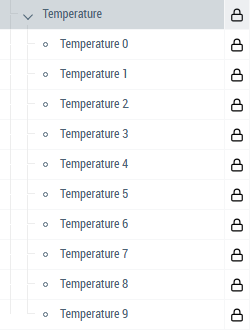
The names for each array index can be specified with Name Array Index. This allows an array to be used in the PLC that corresponds to a structure in the display.
VAR
    {attribute 'TcHmiSystemEng.Name'                 := 'Temperature'}
    {attribute 'TcHmiSystemEng.NameArrayIndex'       := '@this._sName'}
    _fbTemperature                : ARRAY [0..9] OF FB_Temperature;
END_VAR
FUNCTION_BLOCK FB_Temperature
VAR
_sName : STRING := 'Temperature [[index]]';
{attribute 'TcHmiSystemEng.Parameter.Name' := 'Set Value'}
{attribute 'TcHmiSystemEng.Parameter.Info' := 'Set the value of the temperature'}
_nSetValue : REAL;
END_VAR