Reference user interface
With the aid of the TE1420 Target for FMI, TwinCAT runtime objects (TcCOM modules or PLC function blocks) can be generated from FMUs. These are packaged in a TwinCAT driver (*.tmx) or in a PLC library. From a TwinCAT FMI project always exactly one TMX driver and/or PLC library is generated.
The user interface is therefore divided into a general area, in which settings can be set that apply to all runtime objects in this TwinCAT driver/PLC library, and an object-specific part, which contains the settings for the respective runtime object.
The TE1420 can also be operated completely via the command line. (See chapter Command line interface.) For this reason, the respective command line parameter corresponding to a setting is listed in the last column of the tables for clarity.
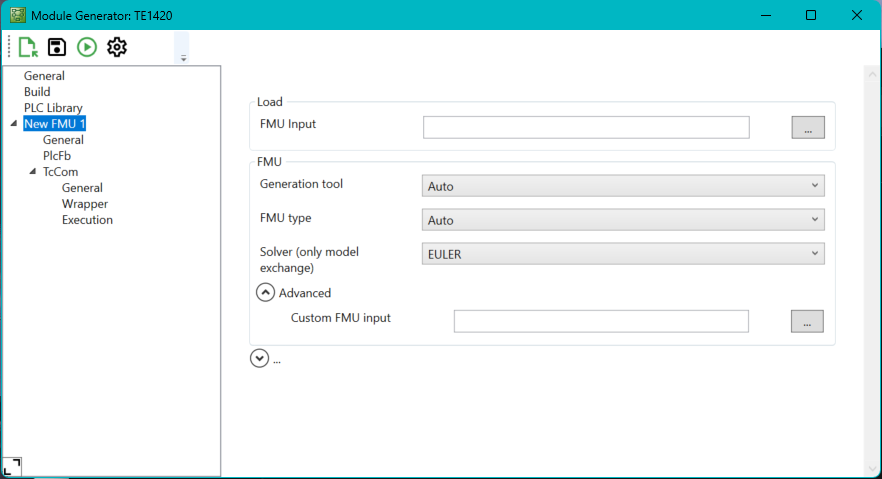
Menu bar
Icon | Description |
|---|---|
| Loads an FMU or configuration. |
| Saves the current configuration. |
| Generates the current configuration. |
| Sets the configuration level. |
| Shows the output window. |
| Hides the output window. |


Context menu in the project tree
Right-click on an FMU:
Setting | Meaning |
|---|---|
Remove | Removes the FMU from the TwinCAT FMI project. |
Restore defaults | Sets the settings of the FMU node to the default values. After that, the FMU can be selected again. |
Right-click on a free area in the project tree:
Setting | Meaning |
|---|---|
Restore defaults | Restores the default values for all FMUs in the TwinCAT FMI project. |
Add new FMU | Adds another FMU to the TwinCAT FMI project. |