Online change of TwinCAT objects
The online change mechanism allows you to switch between different versions of a TwinCAT object (PLC function block or TcCOM module) during operation.
 | Available example in MATLAB® Run the following command in the MATLAB® command line to open the example: |
Online change for PLC function blocks
The online change process then runs via the PLC-specific mechanism. If you use the function block (PLC-FB) in a versioned PLC library, no further configuration is required. (see also: Online change of the PLC library)
Online change for TcCOM modules
To switch between different versions of a TcCOM during operation, the corresponding interface must be implemented. To do this, enable online change support using the following configuration parameter:
exportCfg.ClassExportCfg{1}.TcCom.OnlineChange = true;In addition, created TcCOM data areas must be compatible with each other. If Online change support is activated, the last hierarchical level is more strictly differentiated in the Insert TcCom Object dialog. Only Online Change compatible TcCOM are combined.
The following shows that versions 0.0.0.1 and 0.0.0.3 or 0.0.0.4 and 0.0.0.5 are compatible for Online Change. However, not 0.0.0.3 to 0.0.0.4 or 0.0.0.2.
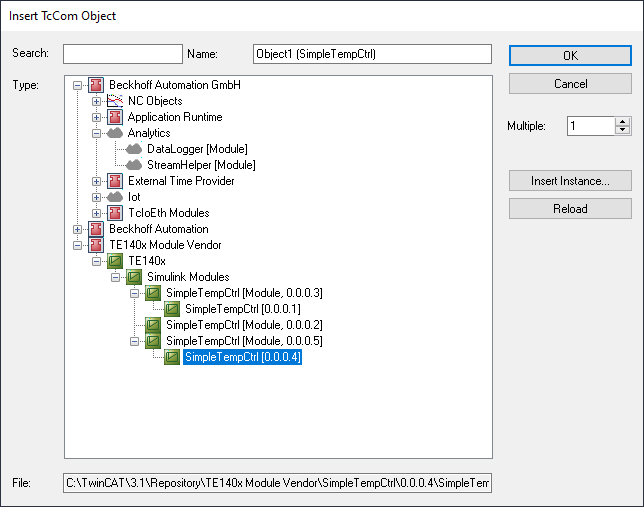
To improve compatibility between data areas, you can, for example, store a function’s Internal and TargetVariables as module parameters rather than in an internal data area. This means that only the inputs and outputs as Data Area are relevant for the compatibility of the TcCOM versions. (additional information on the configuration of data access to data of a TcCOM object)
exportCfg.ClassExportCfg{1}.TcCom.InternalDataAccess = 'Module Parameter'
exportCfg.ClassExportCfg{1}.TcCom. TargetVariablesDataAccess = 'Module Parameter'
In the TwinCAT development environment (e.g., TwinCAT XAE Shell), follow these steps to replace a TcCOM object with a new version.
- You have created a new (compatible) version of a TcCOM module.
- The old version runs in the TwinCAT runtime.
- 1. To perform the Online Change in TwinCAT XAE, use the tree item TcCOM Modules and navigate to the Online Changeable Objects tab.
- 2. Select a version of your choice from the drop-down menu at Online Version (only compatible versions are displayed).
- 3. Right-click on the line of the object and select Apply changed online object versions to activate the new version of the TcCOM.
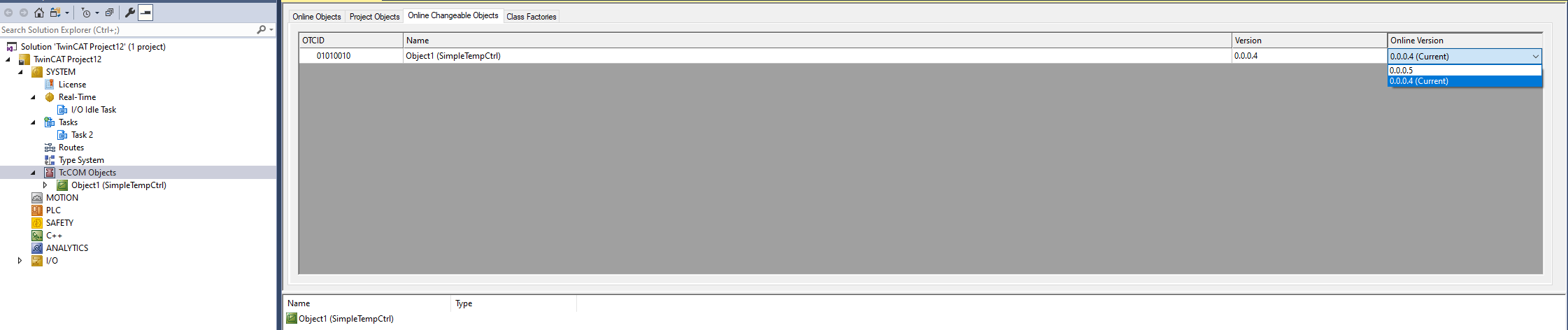
- The new version is now running in the TwinCAT runtime (replacing the old version).
Further information can be found in the TwinCAT C++ documentation.