Bode Plot - Set properties
A Bode Plot can contain three different types of sets (characteristic curves). Record sets for displaying the result of a recording, Filter sets for assessing the characteristic curve of a filter and Result sets for combining two already existing sets.
Some settings concern all sets, some are specialized.
Appearance
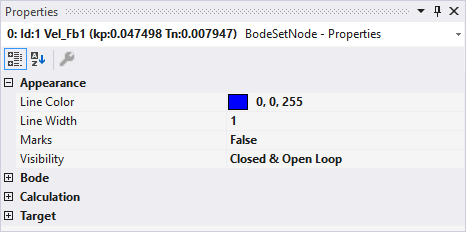
The settings in the Appearance category are available for all sets.
- Line Color: sets the color of the set (characteristic curves and icon in the Solution Explorer).
- Line Width: sets the line width of the set in the Bode Plot editor.
- Marks: indicates whether the interpolation points of the characteristic curve should be displayed.
- Visibility: indicates which variants of the characteristic curves should be displayed. The following values and their combinations are available:
- Open Loop: frequency response of the open loop.
- Closed Loop: frequency response of the closed loop.
- Process: frequency response of the process.
Record Set
In the settings for the record set, you can see the configuration with which the recording took place. Therefore, the same values exist here that are already described in the plot. See Bode Plot - Plot properties
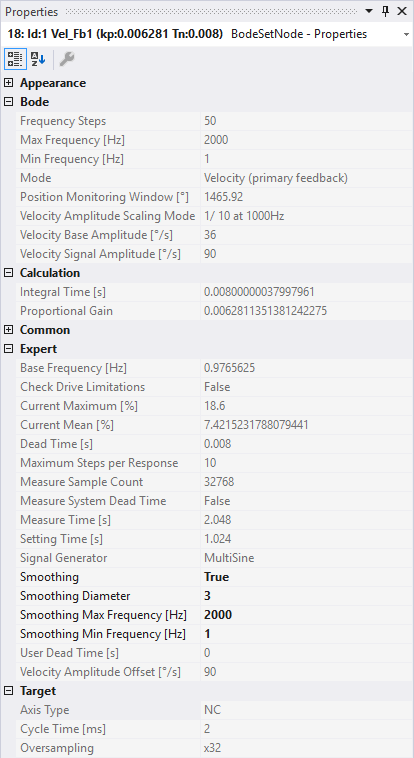
Bode
All settings are summarized under this category in order to configure a new Bode Plot.
- Frequency Steps: indicates the number of measuring points in the Bode Plot.
- Max Frequency [Hz]: indicates the upper frequency limit of the Bode Plot [in Hz].
- Min Frequency [Hz]: indicates the lower frequency limit of the Bode Plot [in Hz].
- Mode: sets the Bode Plot mode. The following are available:
- Torque: executes a Bode Plot for the torque (or current) interface (only for AX5000, AX8000).
- Velocity (primary feedback): executes a Bode Plot for the velocity interface. The actual values of the primary encoder are used for this. (AX5000 only)
- Velocity (dp/dt directly from primary feedback): executes a Bode Plot for the velocity interface. (AX5000 only)
- Velocity (secondary feedback): executes a Bode Plot for the velocity interface. The actual values of the secondary (external) encoder are used for this. (AX5000 only)
- Position (NC interface without oversampling): executes a Bode Plot for the position.
- Velocity (NC interface without oversampling): executes a Bode Plot for the velocity.
- Torque (NC interface without oversampling): executes a Bode Plot on the torque (or current).
The following settings are shown or hidden, depending on the mode:
- Position Monitoring Window [°]: defines a window that is monitored during the Bode Plot. The object must not leave this window. The unit actually set is read out and the number is interpreted in accordance with the unit.
- Position Signal Amplitude [°]: this is where you set the amplitude of the excitation signal.
- Velocity Amplitude Scaling Mode: scales the signal amplitude during recording so that movements are not too large as the frequency increases. The following are available:
- Constant: the amplitude corresponds to the parameterized signal amplitude and remains constant over the entire frequency range.
- 1 / X at 1000Hz: scales the amplitude so that at 1000 Hz it has fallen to 1 / X of the start amplitude of 1 Hz (~1/f). Useful ratios in practice are 1/5, 1/10 and 1/20.
- Torque Amplitude Offset: specifies an offset for the torque amplitude [in %].
- Torque Amplitude Scaling Mode: scales the signal amplitude during the recording, depending on the current frequency. The following are available:
- Autoscale: scales the amplitude so that it is somewhat higher than the noise at a standstill.
- Constant: the signal amplitude remains the same over the entire frequency range. The amplitude 100 means 100% of the maximum current.
- Torque Signal Amplitude: represents the amplitude of the signal (or measurement) oscillation at 1 Hz (see Torque Amplitude Scaling Mode). The unit of measurement is to be taken from the system settings (e.g. Drive, NC, etc.) and cannot be specified here.
- Velocity Base Amplitude: sets the amplitude of the basic oscillation (~1 Hz) for overcoming the static friction. The unit of measurement is to be taken from the system settings (e.g. Drive, NC, etc.) and cannot be specified here.
- Velocity Signal Amplitude: represents the amplitude of the signal (or measurement) oscillation at 1 Hz (see Velocity Amplitude Scaling Mode). The unit of measurement is to be taken from the system settings (e.g. Drive, NC, etc.) and cannot be specified here.
Calculation
- Integral Time [s]: this is read during the plot. It is the integral time of the controller that is set on the drive.
- Proportional Gain: the proportional gain can be used to achieve the desired performance.
Expert
- Base Frequency: shows the frequency [in Hz] of the basic oscillation for overcoming the static friction (in the velocity modes only).
- Check Drive Limitations: If you want to check via the axes, you can specify this here.
- Current Maximum: displays the maximum current utilization [in %] of the recording.
- Current Mean: displays the average current utilization [in %] of the recording.
- Dead Time [s]: Indicates the complete dead time in seconds.
- Maximum Steps per Response: sets the number of measuring points per system response for broadband excitations (e.g. MultiSine, Chirp, PRBS).
- Measure Sample Count: indicates the number of setpoint values and actual values from which an interpolation point of the Bode characteristic curve (a frequency point) is calculated.
- Measure System Dead Time: Indicates whether the system's dead time was measured with this recording, i.e., whether setpoints were copied to actual values.
- Measure Time: indicates the length of time [in s] for which the system is excited with one frequency.
- Setting Time: displays the duration [in s] during which the system settles to the current excitation.
- Signal Generator: displays the excitation type of the signal generator used.
- Smoothing: smoothing of the image using a moving average. The original data are retained here.
- Smoothing Diameter: diameter of the moving average in frequency points.
- Smoothing Max Frequency [Hz]: upper limit for smoothing. Only frequency points below this value are converted.
- Smoothing Min Frequency [Hz]: Lower limit for smoothing. Only frequency points above this value are converted.
- User Dead Time [s]: displays the system's configured dead time.
- Velocity Amplitude Offset [°/s]: displays the offset used for the excitation amplitude.
Target
- Cycle Time: Indicates the last-used cycle time [in ms].
- Oversampling: indicates the oversampling factor to be used. If set to Suggested, the highest useful factor is automatically selected when the recording is started.
Filter Set
The special settings for Filter Sets are represented as follows:
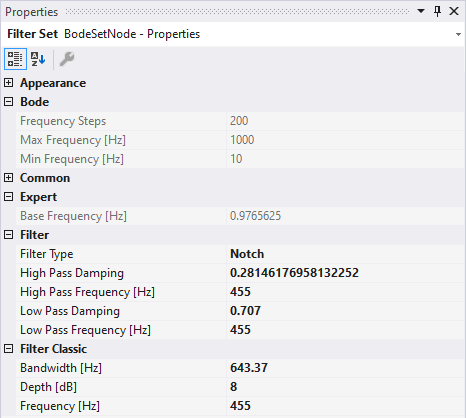
- Filter Type: the type of filter can be set here. The other properties can be edited, depending on the selection. The following are available:
- Lowpass 1st Order: first-order low-pass filter.
- Lowpass 2nd Order: second-order low-pass filter
- Phase Correction 1st Order: first-order phase correction element.
- 2nd-Order Phase Correction: second-order phase correction element.
- Notch: notch filter.
- High-Pass Damping: high-pass damping factor.
- High-Pass Frequency: high-pass frequency [in Hz].
- Low-Pass Damping: low-pass damping factor.
- Low Pass Frequency: low-pass frequency [in Hz].
Result Set
In order to obtain the overlapping of two already existing sets, they must be specified in the settings for the Result Set.
Upon selecting the field, a list of possible sets is displayed.
The resulting characteristic curve is automatically determined from the two sets if the number and positions of the interpolation points match. If one of the two source sets changes, then the Result Set is also re-calculated.
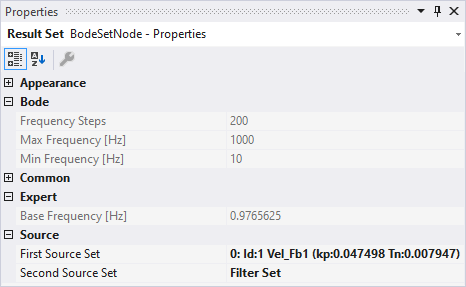
Source
- First SourceSet Name: name of the first source set.
- Second SourceSet Name: name of the second source set.