Settings tab
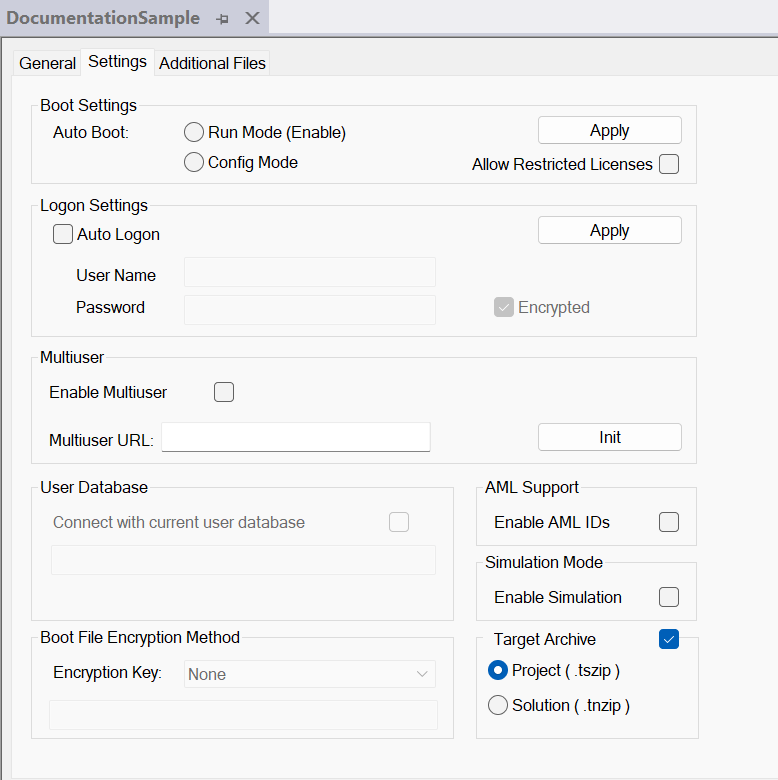
Boot Settings
Auto Boot |
|
Allow Restricted Licenses | Enables the use of Restricted Runtime licenses. It is prohibited to use Restricted Runtime licenses on machines. |
Auto Logon | If, in addition to the “Run Mode (Enable)” option, the “Auto Logon” option is also enabled, TwinCAT starts in Run Mode and the loaded and enabled boot projects are processed independently. |
User Name Password | User name and password If you are working with an IPC, you can find more information on logging in to a system in the Windows 10 IoT Enterprise (LTSB/LTSC) documentation in the General information chapter. |
Encrypted | Saves the “auto logon” password in encrypted form in the Windows Registry on the target system. (The password is stored as plain text if the checkbox is not selected.) |
Apply | The settings are applied. |
| |
Serious bodily injury and property damage caused by a sudden machine shutdown during operation When Restricted Runtime licenses are activated and used on machines, TwinCAT automatically switches to Config Mode after 6 hours. This can cause the machine to stop suddenly, resulting in unpredictable movements that may lead to serious injury or damage to the machine or workpieces. It is prohibited to use Restricted Runtime licenses on machines.
|

Multiuser
Enable Multiuser | Turns on the multiuser function for the System Manager. |
Multiuser URL | Displays the multiuser URL for the Remote Repository or offers the possibility to change it. |
Init | Initializes the multiuser function. |
User Database
Connect with current user database | Connects the project with a user database. |
AML Support
Enable AML IDs | Turns on the support of AML IDs. The AML IDs are stored in the project. |
ADS Symbolic
UTF-8 Encoding | The ADS Symbolic uses UTF-8 encoding (this option is fixed from version 3.1.4026, so this option is omitted from this version). |
Simulation Mode
Enable Simulation | Activates simulation mode for the entire project. |
Boot File Encryption Method
Encryption Key | Encryption of the boot file
|
Target Archive
Project (.tszip) | Saves the TwinCAT 3 project only in the archive on the target system. |
Solution (.tnzip) | Saves the entire solution in the archive on the target system. |