Mounting and wiring
| |
Dangerous electrical voltage leads to electric shock and arc flashover! Non-compliance will result in death, personal injury or considerable material damage!
|

Mounting the transformer housing on the primary conductor
- 1. Open the current transformer and attach it to the primary conductor.
- For the correct assignment of the individual conductors, please note the numbering on the front of the individual split-core transformer housings
- The direction of energy flow is marked on the side of the housing in the direction of the arrow from K (pointing to the source) to L (pointing to the loads). The labeling is located for
- SCL60xx (size 1): on the underside
- SCL61xx (size 2) on the contact surface of the primary conductor
- SCL62xx, SCL63xx (sizes 3 and 4) on the mounting lugs for the primary conductor
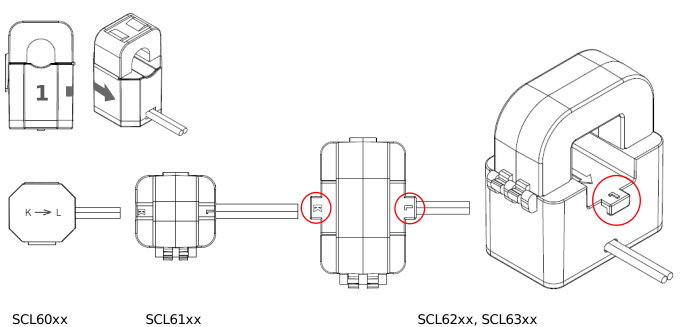 Fig.17: Marking of conductor and energy flow direction, fixing lugs for primary conductors
- 2. Attach the SCL62xx and SCL63xx split-core transformer additionally with cable ties to the fastening straps (see fig. above) on the front and rear side of the housing. This avoids mechanical loading of the core by the primary conductor and the resulting measurement uncertainty.
| |
Avoid soiling and moisture! Make sure that the cut surfaces of the split-core are free of dirt and dry. Avoid hand contact (sweat)! Any type of contamination increases the measurement uncertainty. |
- 3. Close the split-core transformer – press together until the closure engages.
- 4. Check that the split-core transformer is fitted correctly.
Connection of the measuring unit
- 1. Connect the connection housing of the transformers to the measuring unit for distributed power measurement (e.g. EL3475, EL3475-xxxx) via:
- the pre-assembled sensor cable ZK2003-91D1-3xxx, shielded, PVC, 4 x 2 AWG26, for fixed installation, gray,
- the EtherCAT connector C9900-K938, an 8-pin EtherCAT cable and an application-specific connector.
 | Note on connecting the measuring unit We recommend connection via the pre-assembled sensor cable,
|
- 2. To do this, insert the RJ45 plug of the connection cable into the RJ45 socket of the transformer housing so that the arrows printed on it match and push the plug into the socket until it audibly clicks into place.
- 3. Also lock the connection with the red locking ring on the connector housing.
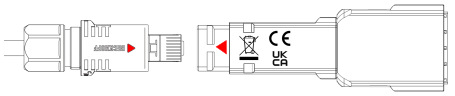 Fig.18: Connect the secondary side of the transformer to the measuring unit
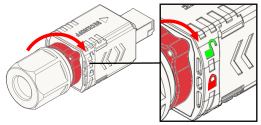 Fig.19: Locking the connection to the measuring unit
Alternative connection option for laboratory operation
- an 8-pin standard EtherCAT cable with RJ45 plugs (e.g. ZK1093-9191-0xxx).
The connection housing of the transformers is designed so that most standard RJ45 plugs snap into the housing. - Make sure that the RJ45 plug is securely engaged in the connection housing of the transformer!
- A small screwdriver is required for disassembly (e.g. ZB8701).
| You can use the position of the latching lug to determine whether the plug snaps into the connection housing: | |
|
|
|
|
| |
|
|
|
|
| |


Notice | |
Alternative connection option for laboratory operation only The solution described above is suitable for laboratory use and is not recommended for industrial environments.
|
Mounting the transformer on the mounting rail
The SCL/SVLxxxx transformers can be attached to the mounting rail using the ZB8201‑0900 snap-on mounting.
- 1. Screw the snap-on mounting to the mounting surface or snap it onto the mounting rail. Note the correct direction - the arrows point upwards.
- 2. To do this, first push the upper rigid end onto the mounting rail,
- 3. then press the lower flexible end onto the mounting rail.
- 4. Insert the transformers with the primary connections facing downwards onto the mounting bracket so that the latching cams on the mounting rails engage audibly in the receptacles of the connection housing.
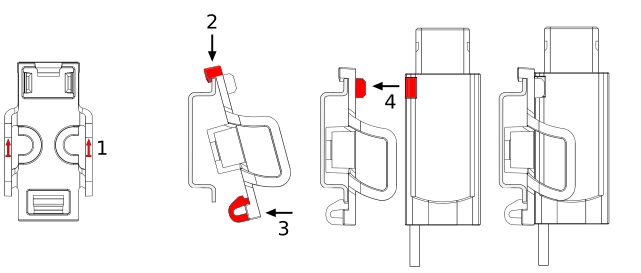 Fig.20: Attaching the SCL/SVL transformers to the mounting rail using the ZB8201-0900 snap-on mounting