EtherCAT configuration
The ER9320-0022 is an EtherCAT master with automatic configuration. This means that all EtherCAT slaves must already be connected and in operation when switching on. Since the boot-up of the ER9320-0022 generally takes considerably longer than the start-up of the connected EtherCAT devices, the latter can be operated on the same power supply.
For decentralized EtherCAT devices, make sure that the supply voltage of these EtherCAT devices is switched on earlier or at the same time as the supply voltage of the ER9320-0022.
Switching EtherCAT devices on or off during operation
If one or more EtherCAT devices fail during operation, the ER9320-0022 sends a PROFINET alarm of the type "Pull"; the data exchange continues. The input data of all EtherCAT devices are invalid and are set to FALSE or ZERO; the output data are no longer accepted. This also applies to the devices that are still in operation on the ER9320-0022.
If you want to connect and disconnect EtherCAT devices during runtime, you must configure an additional "Sync Unit". This is not possible with ER9320-0022. In this case use a CX8093.
EtherCAT devices that don’t exist in the GSDML
Some EtherCAT devices are not included in the GSDML and thus cannot be used (yet). The CX8093 can be used here, since it supports all EtherCAT devices in principle.
EtherCAT topology
All EtherCAT devices must be entered in the order in which they are arranged in the EtherCAT network.
EtherCAT devices are addressed automatically. With a few exceptions all EtherCAT devices are equipped with an EtherCAT ASIC, which must also be entered in the system, i.e. the PROFINET controller. EtherCAT devices without an ASIC are, for example, EL9400, EL9070 and other EL9xxx. You can recognize these EtherCAT devices by the "Message to E-bus" entry in their technical data: If there is a "-" here, the EtherCAT device does not have to be entered in the PROFINET controller either.
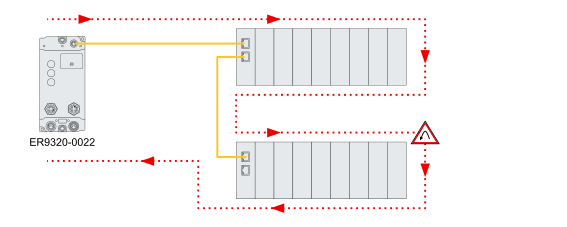
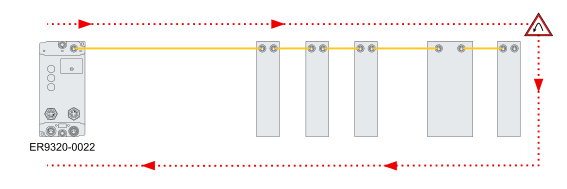
EtherCAT devices are registered in the running direction of the EtherCAT telegram.
Topology example with the EK1100 EtherCAT Coupler
|
|
|
|
|
|
|
|
|


Topology example with EtherCAT Box modules
|
|
|
|
|
|
|
|
|
Example configuration with EK1122 2-port EtherCAT junction
The counting direction is to be observed when using an EK1122. If EtherCAT junction 1 on the EK1122 is connected, then the EtherCAT frame is forwarded here first (1). If junction 1 is not connected the frame on junction 2 is sent (2), only after that does the sequence continue with the E-bus on the right-hand side (3).
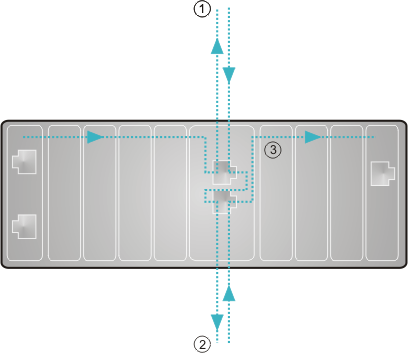
If both junctions are not used, then junction 1 and 2 are short-circuited as it were and the EtherCAT frame continues directly from the terminal to the right.
Note that in the PROFINET controller the modules are entered in the direction of the EtherCAT frame.
Example configuration with EP1122 2-port EtherCAT junction
The counting direction is to be observed when using an EP1122; it is comparable with the EK1122. If EtherCAT junction 1 on the EP1122 is connected, then the EtherCAT frame is forwarded here first (1); if junction 1 is not connected the frame on junction 2 is sent (2), only after that does the sequence continue with the EC-bus on the right-hand side (3).
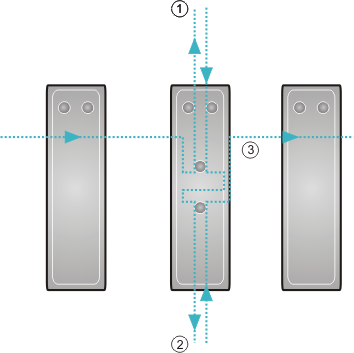
If both junctions are not used, then junction 1 and 2 are short-circuited as it were and the EC frame continues directly from the terminal to the right.
Note that in the PROFINET controller the modules are entered in the direction of the EtherCAT frame.
 | Connection during operation You cannot use the EP1122 and EK1122 for Hot Swap or connect or disconnect them during operation. |