Activating process data
In order to be able to use the digital inputs/outputs, you have to activate the input and output variables in the process image:
- Prerequisite: The EPP6001-0002 has been added under IO in Solution Explorer.
- 1. Double-click the EPP6001-0002 I/O module.
- 2. Click on the Process Data tab.
- 3. Click on the "Outputs" entry in the Sync Manager field.
- 4. Activate the PDO Assignment (0x1C12) checkbox next to the entry "0x1608".
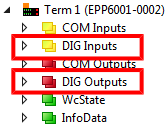
- The process data object "DIG Outputs", appears in the process data.
- 5. Click on the "Inputs" entry in the Sync Manager field.
- 6. Activate the PDO Assignment (0x1C13) checkbox next to the entry "0x1A08".
- The process data object "DIG Inputs", appears in the process data.
- Result: The process data objects for the digital inputs/outputs are activated: