Status LEDs
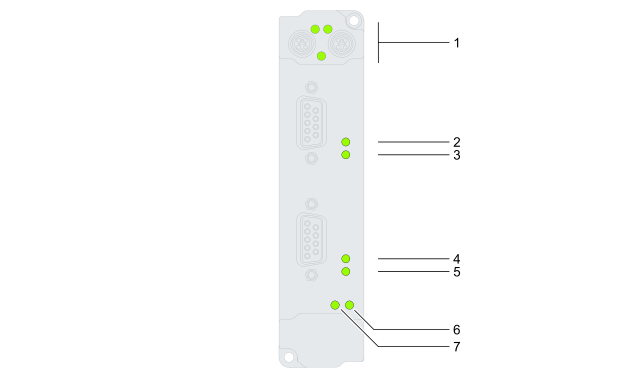
Position | Description | Display | Meaning |
|---|---|---|---|
1 | EtherCAT status | See chapter EtherCAT | |
2 | Switching status of the digital outputs, Channel 1 | Off | All digital outputs on Channel 1 are low |
Green | One or more digital outputs on Channel 1 are high | ||
3 | Error state of the digital outputs, Channel 1 | Off | No error |
Red | Short circuit at one or more outputs of Channel 1 1) | ||
4 | Switching status of the digital outputs, Channel 2 | Off | All digital outputs on Channel 2 are low |
Green | One or more digital outputs on Channel 2 are high | ||
5 | Error state of the digital outputs, Channel 2 | Off | No error |
Red | Short circuit at one or more outputs of Channel 2 1) | ||
6 | Status of UP | Off | UP is not connected |
Green | UP is on | ||
7 | Status of US | Off | US is not connected |
Green | US is on | ||
1) Depending on the configuration, the status LED may continue to glow red after the short circuit has been cleared, since the affected digital output is not automatically reactivated.
For more information on this behavior, see the chapter Behavior in case of short circuit.
Short-circuit detection is achieved by comparing the desired state (high) with the actual state.