Commissioning in TwinCAT 3
Use the following steps to configure an EP7414-x071 for operation with Drive Motion Control.
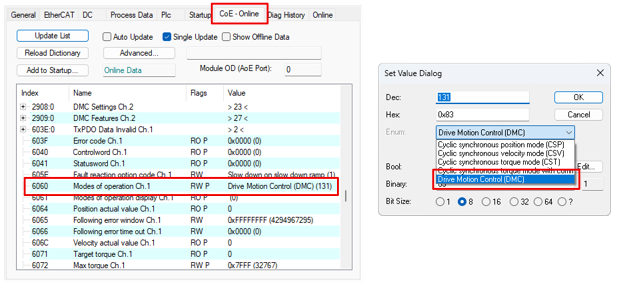
- 1. Set the value to -125 Modes of operation Ch.1/2 in CoE parameter 0x6060/0x6860 Drive Motion Control (DMC).
- 2. Activate the Predefined PDO Assignment Drive motion control (For TC3 DriveMotionControl Lib).
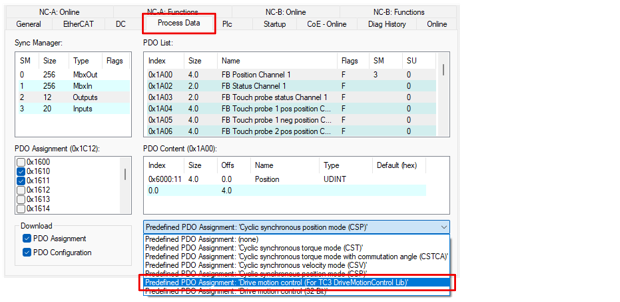
- The process data for using Drive Motion Control are activated.
PLC configuration
- 1. Create a PLC project if none has been created yet.
- 2. Add the “Tc3_DriveMotionControl” library to the PLC project.
(If you want to use Drive Motion Control without the “Tc3_DriveMotionControl” library, see chapter State machine.)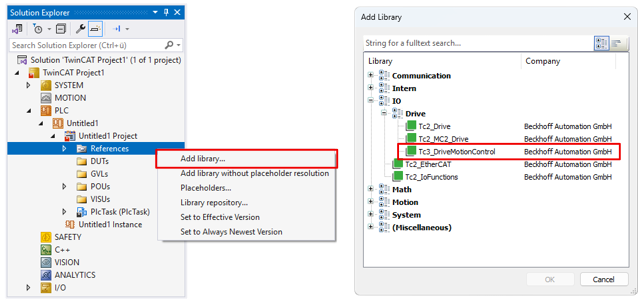
- 3. If the “Tc3_DriveMotionControl” and “Tc2_Mc2” libraries are used simultaneously in the current project:
Set the “Qualified access only” property to “True” in the “Properties” window for one of the two libraries.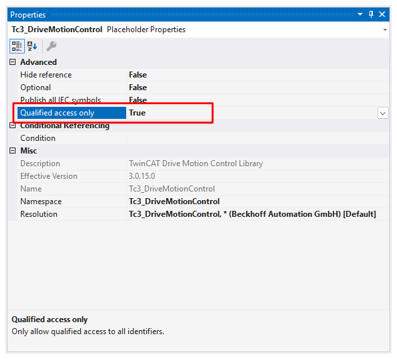
- The library with “Qualified access only” can only be addressed in the PLC code via the corresponding namespace, e.g.:
Tc3_DriveMotionControl.MC_Stop()
This avoids name conflicts, e.g. when calling the function blockMC_Stop, which has the same name in both libraries. - 4. Declare a variable of type “AXIS_REF” in the PLC. Sample:
VAR
   DmcAxis:   AXIS_REF;
END_VAR - 5. Click on “Build’ > “Build Solution” in the menu bar.
- The project is compiled.
- The process image of the PLC task is generated.
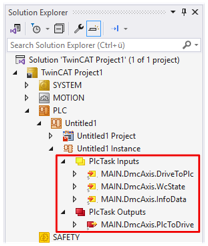
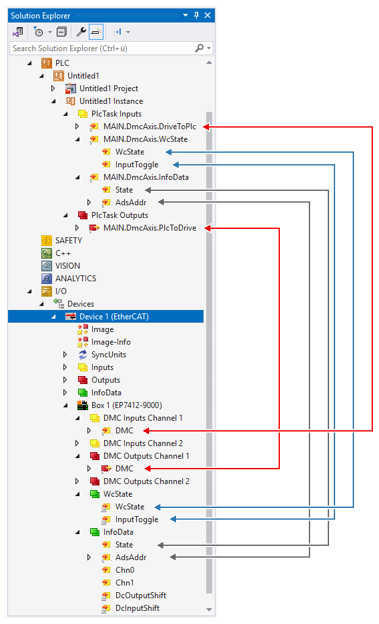
- 6. In the Solution Explorer link the PLC variables with the process data of EP7414-x071.
- 7. In the PLC code, call the function block
ReadStatus()cyclically, ideally at the beginning of each PLC cycle.
Further Information