Current controller optimization
The current controller is a PID controller. The controller parameters of the current controller are set ex factory so that the current controller is compatible with as many different loads as possible. However, the control behavior can be significantly optimized by adapting the controller parameters to your specific load.
Example: step response
Before optimization | After optimization |
|
|
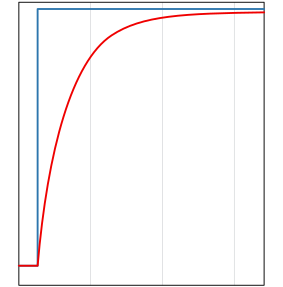
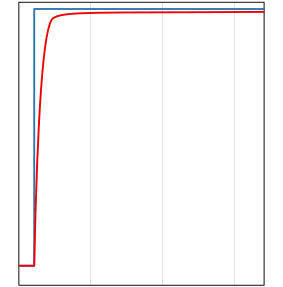
Horizontal scaling: 20 ms/div
Blue: current setpoint
Red: actual current value
Controller parameters
The controller parameters can be found in the following CoE parameters:
Index 1) | Name | Description |
|---|---|---|
8pp0:13 | Kp Factor | Proportional component |
8pp0:14 | Ki Factor | Integral part |
8pp0:15 | Kd Factor | Differential component |
1) pp = 00…03 for channel 1…4
Current controller optimization with TwinCAT
You can perform the optimization with the TwinCAT Scope View as follows:
- 1. Make sure that the following CoE parameters are in the factory setting:
8pp0:07 "Operation Mode" (factory setting "Current Control")
8pp0:09 "Enable Feedforward" (factory setting "FALSE")
8pp0:21 "Select info data 1" (factory setting "Actual current")
8pp0:22 "Select info data 2" (factory setting "Set current") - 2. Enable the process data object 0x1Ap1 "PWM Synchron Info Data Channel n", see chapter Enabling additional process data.
- 3. Set a low cycle time to achieve a high temporal resolution of the measured values.1)
- 4. Display "Info Data 1" and "Info Data 2" from the process data object "PWM Synchron Info Data Channel n" in a Scope View.
- 5. Enter a setpoint step-change to the variable "PWM Output".
- 6. Record the step response/square wave signal in the scope and optimize the controller parameters (see above) using one of the usual methods for PID controllers.
1) The minimum possible cycle time depends on the number of enabled channels. You can measure it by setting parameter 1C32:08 to TRUE, then reading 1C32:05 "Minimum cycle time".