Optimization of the velocity controller
The velocity controller is a PI controller. It is only active if field-oriented control is activated (Commutation type = "Stepper FOC with encoder").
The following parameters are optimized in this chapter:
- The integral component Tn
- The proportional component Kp.
Preparation
- 1. Open the "Run motor" menu
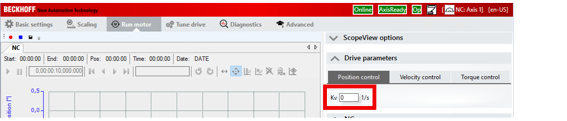
- 2. Temporarily disable the position controller by setting the value Kv of the position controller to 0.
- 3. Click the "Start record" button.
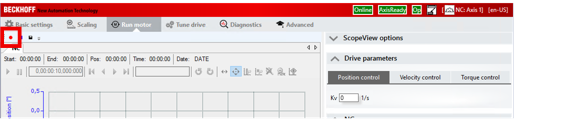
- The Scope View records position, velocity and following error.
- 4. Under "NC": select "Functions"
- 5. In the "Start mode" field, select the "Reversing sequence" entry
- 6. Enter realistic values in the following fields:
Target position 1
Target velocity
Target position 2 - 7. Click the "Start" button.
- The motor performs the set movement periodically.
- 8. If necessary, reduce the acceleration time
See chapter Dynamics. - 9. Under "Drive Parameters", select the "Velocity control" tab
- You can set the controller parameters of the velocity controller here.
Optimization of the integral component Tn
- 1. Reduce the Tn value step by step
Confirm each entry with [Ctrl] + [Enter]
Meanwhile, observe the Scope View - At a certain value of Tn, the motor starts to oscillate.
Example without oscillation: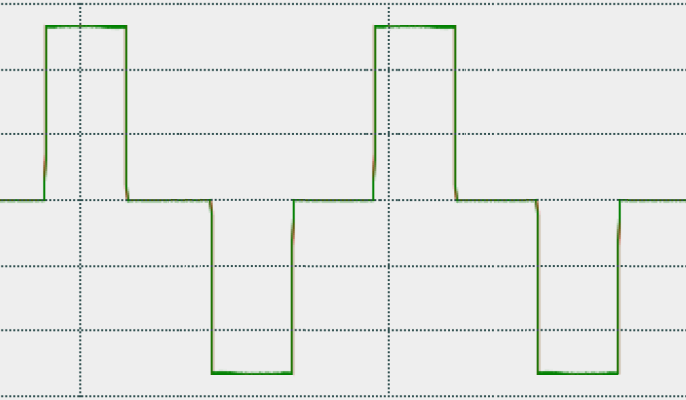
Example with oscillation: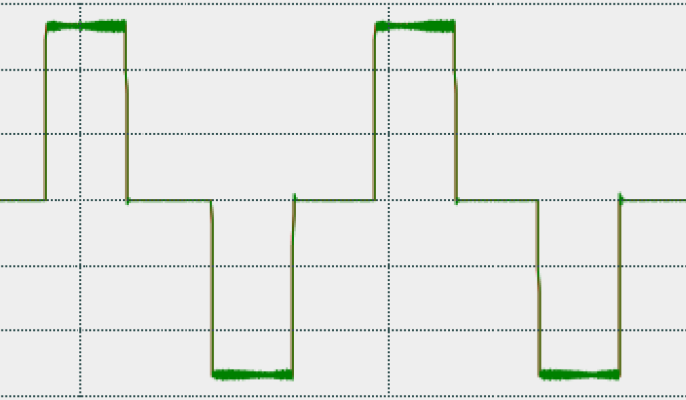
From here on, do not reduce the Tn value any further. - 2. Increase Tn again until the motor no longer oscillates
- 3. Increase Tn a bit more, depending on the application
- The integral component Tn is optimized.
Optimization of the proportional component Kp
The optimization of Kp is analogous to the optimization of Tn. However, you do not have to reduce Kp, but increase it.
- 1. Increase the Kp value step by step
Confirm each entry with [Ctrl] + [Enter]
Meanwhile, observe the Scope View - At a certain value of Tn, the motor starts to oscillate. See above.
- 2. Reduce Kp again until the motor no longer oscillates
- 3. Still reduce Kp a little. Depending on the application