Configuring the IO-Link master
 | EtherCAT XML Device Description The display matches that of the CoE objects from the EtherCAT XML Device Description. We recommend downloading the latest XML file from the download area of the Beckhoff website and installing it according to installation instructions. |
When adding the IO-Link master in the TwinCAT System Manager (see chapter Setup in TwinCAT System Manager in the EtherCAT system documentation), an additional tab called “IO-Link” is created (see following figure). A more detailed description can be found in chapter Configuring IO-Link devices.
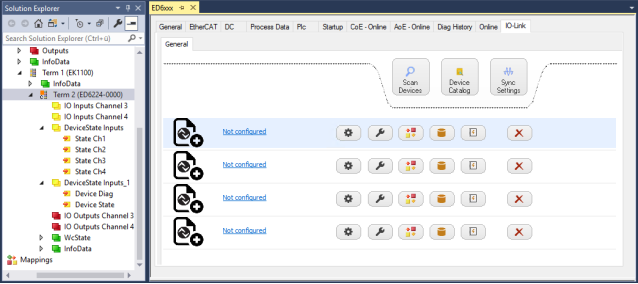 Fig.18: “IO-Link” tab
 | IO-Link extension If the “IO-Link” tab does not appear as shown in the figure above, the corresponding System Manager extension is missing. The System Manager extension is required for TwinCAT version 2.10, build 1325 to 1330.
|