Determining the counter limits (Reset counter value / Limit counter value)
Counter limits in delivery state
In delivery state the counter value “Counter Value” counts in the range from 0 to the maximum counter depth. When the maximum counter depth is exceeded “Counter overflow” the counter starts counting up from zero again. When the counter limit is exceeded, this is indicated by the “Counter overflow” bits (see chapter “Determining the counter limits (“Reset counter value”/“Limit counter value”)”).
- PDO Assignment “Standard”: 0 to 232-1
- PDO Assignment “Compact”: 0 to 216-1
When a counter underflow occurs, the count continues at the maximum counter depth even if e.g. “Enable extern reset” is enabled in index 0x80n0:02. The underflow is identified with the corresponding “Counter underflow” bit.
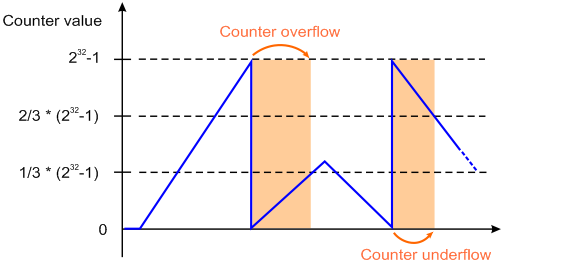
Counter limits with defined value range
If counting is only to take place in a defined value range, the counter limits can be adjusted.
 | Set counter limits For writing to index 0x80n1:1B “Reset counter value” and index 0x80n1:1A “Limit counter value”, the value 0x72657375 (ASCII: “user”) must be set in 0xF008 “Code word”. |
- Specify the lower counter limit in index 0x80n1:1B “Reset counter value”.
- Specify the upper counter limit in index0x80n1:1A “Limit counter value”.
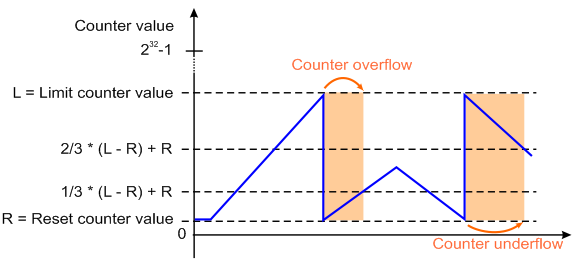
| Counter limits
|
If the counter is parameterized to a counter value outside the counter limits during runtime, this counter value is applied. Exceeding the counter limit is indicated by the process data “Counter value out of range” (index 0x60n2:15).
Example:
The process data “Set counter value” (0x70n0:11) contains a value that exceeds the counter limits, and the bit in the process data “Set counter” (0x70n0:03) is activated.
- The value specified in the process data “Set counter value” (0x70n0:11) is used.
- The bit in the process data “Counter value out of range” (0x60n2:15) is set.
If the counter limits are parameterized in such a way that the current counter value is outside these limits, the underflow/overflow of the counter limit is also shown via the process data “Counter value out of range” (0x60n2:15).
Counter overflow and Counter underflow
An overflow or underflow of the counter limits is indicated by the process data “Counter underflow” (0x60n0:04) or “Counter overflow” (0x60n0:05).
- The bit in the process data “Counter underflow” (0x60n0:04) is set when an underflow occurs 0x80n1:1B “Reset counter value” → 0x80n1:1A “Limit counter value”.
- With the preset parameters this corresponds to “..00 → ..FF”
It is reset if 2/3 of the counting range are underrun. - For counting limits with fixed values, this corresponds to:
2/3 * (“Limit counter value” - “Reset counter value”) + “Reset counter value” - The bit in the process data “Counter overflow” (0x60n0:05) is set when an overflow occurs 0x80n1:1A “Limit counter value” → 0x80n1:1B “Reset counter value”.
- With default parameters “..FF → ..00”
It is reset if 1/3 of the counter range is exceeded. - For counting limits with fixed values, this corresponds to:
1/3 * (“Limit counter value” - “Reset counter value”) + “Reset counter value”
Example 1:
0x80n1:1A “Limit counter value” = 212 – 1 = 4095
0x80n1:1B “Reset counter value” = 0
The “Counter underflow” bit is reset when: 2/3 × 4095 = 2730 is reached.
The “Counter overflow” bit is reset when: 1/3 × 4095 = 1365 is reached.
Example 2:
0x80n1:1A “Limit counter value” = 212 – 1 = 4095
0x80n1:1B “Reset counter value” = 400
The “Counter underflow” bit is reset when: 2/3 × (4095 - 400) + 400 = 2463 is reached.
The “Counter overflow” bit is reset when: 1/3 × (4095 - 400) + 400 = 1632 is reached.