Sensor calibration
The sensor calibration adjusts the device to the characteristic curve of the sensor element. Two values are required for this procedure: the output value without a load (‘zero balance’) and fully loaded (‘rated output’). These values can be determined by a calibration protocol or by a calibration using calibration weights.
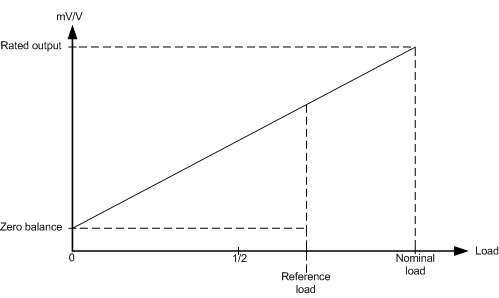 Fig.70: Adaptation to the sensor curve
 | Calibration The calibration is of great importance for the accuracy of the system. In order to increase this, the filter should be set as strong as possible over the entire calibration phase. It may take several seconds before a static value is obtained. |
| Local storage The values modified during the theoretical and practical calibration are stored in a local EEPROM. This can be written to up to 1 million times. In order to prolong the service life of the EEPROM, therefore, the commands should not be executed cyclically. |
Adjustment in the system
In the "practical" calibration, measurement takes place first with the scales unloaded, then with a defined load on the scales. The device automatically calculates the existing sensor characteristic values from the measured values.
To do this, follow the procedure below. The adjustment is channel-specific (n = 3 (Ch. 1), n = 7 (Ch. 2).
- Perform CoE reset with object 0x1011:01 (see Restoring the delivery state)
- Set scale factor(0x80n0:27) to the desired value (default: 1000, 1 kg is displayed as 1000 g)
- Set gravity of earth (0x80n0:26) if necessary (default: 9.80665016)
- Set filter 1 (0x80n0:15) to the strongest level: IIR8
- Specify the nominal load of the sensor in 0x80n0:24 ("Nominal load"). The scaling must correspond to the scale factor. If the nominal load is specified as 4 kg and the scaling is set to 1000, you must
- Zero adjustment: Do not load the scales
- Wait until the measured value shows an unchanging value for at least 10 seconds (Control.PDO Steady state = 1)
- Then execute the command "0x0101" (257dec) on CoE object 0xB0n0:01. This command enters the current measured value into the ‘Zero balance’ object.
- Check: CoE objects 0xB0n0:02 and 0xB0n0:03 must contain "0" after execution
- Gain adjustment: Apply a reference load to the balance.
- The reference weight should be at least 20 % of the nominal load. The larger the reference load, the better the sensor values can be calculated.
- In object 0x80n0:28 ("Reference load"), enter the load in the same unit as the nominal load (0x80n0:24).
- Wait until the measured value shows an unchanging value for at least 10 seconds (Control.PDO Steady state = 1)
- Then execute the command "0x0102" (258dec) on CoE 0xB0n0:01. This command enters the current measured value in the "Sensitivity" object.
- Check: CoE objects 0xB0n0:02 and 0xB0n0:03 must contain "0" after execution
- Reset: Execute command "0x0000" (0dec) on CoE object 0xB0n0:01.
- Set the filter to a lower stage.
Theoretical adjustment according to sensor adjustment protocol
The sensor characteristic values according to the manufacturer's certificate are communicated here directly to the device, so that it can calculate the load.
- Perform CoE reset with object 0x1011:01 (see Restoring the delivery state)
- Gravity of earth (0x80n0:26) (default: 9.80665016)
- Adopt the "Zero balance" (0x80n0:25) from the calibration protocol
- Transfer "Sensitivity" (mV/V value 0x80n0:23) from the calibration protocol
- Specify the nominal load of the sensor in 0x80n0:24 ("Nominal load")
- If required, change the scaling in 0x80n0:27 ("Scale Factor"; default: 1000) to scale in grams, kilograms, tons, etc