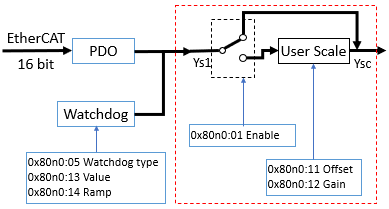
Specifying the pulse width | “PWM Output” process data value
To change the duty cycle
(TON/TOFF) [0…100%], the valid value range can be set using the parameters
Presentation (0x80n0:02) and
User Scale (“Enable User Scale”/0x80n0:01 “Offset” 0x80n0:11/“Gain” 0x80n0:12)
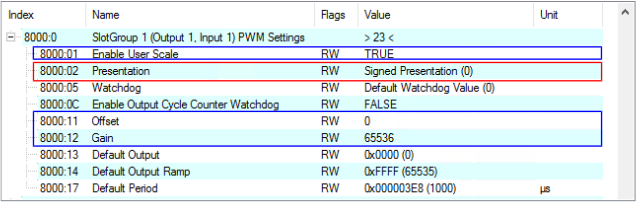 Fig.27: “PWM output” duty cycle settings
Presentation (0x80n0:02)
Duty cycle | “PWM output” | |
|---|---|---|
0x80n0:02 “Presentation” = 0: Signed (default) | 0x80n0:02 “Presentation” = 1: Unsigned | |
0% | 0hex (0dec) | 0hex (0dec) |
50% | 3FFFhex (16,383dec) | 7FFFhex (32767dec) |
100% | 7FFFhex (32,767dec) | FFFFhex (65,535dec) |
(n = 0 for PWM1, n = 2 for PWM2, n = 4 for PWM3, n = 6 for PWM4) | ||
User scaling (“Offset” 0x80n0:11 / “Gain” 0x80n0:12)
- Value range without user scale in the factory setting (default)
User scale is not enabled in the factory setting ("Enable user scale" = FALSE). No further user scale settings (0x80n0:12 "Gain"/0x80n0:11 "Offset") are required.
Value range: 0 ... FFFFhex (65535dec) for 0 ... 100% duty cycle - Set the value range via the user scale (see block diagram)
- Enable user scale via index 0x80n0:01 "Enable user scale"
- Set the desired value range via 0x80n0:11 "Offset" and 0x80n0:12 "Gain".
With: Is the influence of user scale: active: Ysc = Ys1 * Gain*2-16 + Offset |
|