Ethernet interfaces
You can program and commission the CX8290 Embedded PC via the Ethernet interface X001. The Ethernet interface achieves speeds of 10/100/1000 Mbit/s.
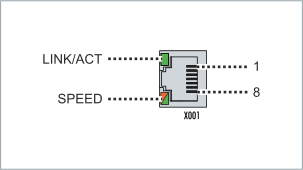 Fig.3: Ethernet interface X001, X101, X102.
The LEDs on the left of the interface indicate the connection status. The upper LED (LINK/ACT) indicates whether the interface is connected to a network. If this is the case, the LED lights up green. The LED flashes when data transfer is underway on the interface.
The lower LED (SPEED) indicates the connection speed. At a speed of 10 Mbit/s, the LED does not light up. At a speed of 100 Mbit/s, the LED lights up green. At 1000 Mbit/s (Gigabit), the LED lights up orange.
PIN | Signal | Description |
|---|---|---|
1 | TD + | Transmit + |
2 | TD - | Transmit - |
3 | RD + | Receive + |
4 | connected | reserved |
5 | ||
6 | RD - | Receive - |
7 | connected | reserved |
8 |
Ethernet interfaces X101 and X102
Both Ethernet interfaces are switched and dependent on each other. Both Ethernet interfaces reach speeds of 1000 Mbit/s.
Protocols such as Real Time Ethernet optional PROFINET (TF627x), EtherNet/IP (TF628x), BACnet/IP (TF8020) and ADS UDP/TCP, Modbus TCP Client/Server or open TCP/IP-UDP/IP communication are supported.
PIN | Signal | Description |
|---|---|---|
1 | TD + | Transmit + |
2 | TD - | Transmit - |
3 | RD + | Receive + |
4 | connected | reserved |
5 | ||
6 | RD - | Receive - |
7 | connected | reserved |
8 |
Gigabit switch: Configuration and loss-free data transmission
The baud rate of each port can be set to a fixed value via PROFINET. Autonegotiation is active by default. The switch uses the Cut-Through method to transmit frames with minimal latency.
For optimum performance, both ports should be operated at the same baud rate. At different speeds, the switch automatically adapts to the store-and-forward method. To avoid frame loss, it is advisable to adjust the data rate to a lower speed in this case.
First example: Different baud rates with data loss
- Port 1: 100 Mbit/s
- Port 2: 1000 Mbit/s
An industrial PC connected to port 2 sends large amounts of data to an industrial PC connected to port 1 of the switch. Due to different port speeds, the switch cannot operate in Cut-Through mode and must buffer the frames. However, the buffer capacity (e.g. in the EL6633) is not sufficient for the amount of data generated.
Result: Frames are discarded → retries by the protocol → increased network load → lower overall performance.
Second example: Different baud rates without problems
A pure PROFINET network without additional Ethernet services:
- Port 1: PROFINET controller with 100 Mbit/s
- Port 2: PROFINET devices with 1000 Mbit/s
As the data is transferred from the slower (100 Mbit/s) to the faster (1000 Mbit/s) network segment - i.e. from the PROFINET controller to various PROFINET devices - there are no bottlenecks. The network load is already limited by the 100 Mbit/s segment. Example: A utilization of 25% at 100 Mbit/s corresponds to only 2.5% utilization on the gigabit side.
Setting a fixed baud rate
The baud rate is set via the PROFINET controller in the manufacturer's project engineering tool. The "Adjustable MauType" function must be supported for this; the manufacturer of the PROFINET controller should be checked to see whether this is the case.
- The setting requires active PROFINET communication
- When setting for the first time, the link can be briefly interrupted (restart of the Ethernet port)
- The baud rate is retained after the restart
- 10 Mbit/s is only available via autonegotiation
Recommendation: Keep the default setting Autonegotiation.
Port 1 (Mbit/s) | Port 2 (Mbit/s) | Transmission direction | Procedure | Possible effects | Recommendation |
|---|---|---|---|---|---|
100 | 100 | both directions | Cut-Through | Optimum performance, no buffering problems | OK |
1000 | 1000 | both directions | Cut-Through | Optimum performance, no buffering problems | OK |
100 *) | 1000 | 100 → 1000 | Store-and-Forward | No bottlenecks, load is limited by the slower port | OK |
1000 | 100 | 1000 → 100 | Store-and-Forward | Buffer overflow possible → frame losses → higher network load | Adjust speeds or limit data rate |
10 | variable | both directions | Autonegotiation required | Very low speed, potential bottleneck | Not recommended |
variable | 10 | both directions | Autonegotiation required | Very low speed, potential bottleneck | Not recommended |
*) The PROFINET controller is connected to Port 1 (possibly via additional switches). Note: This configuration applies only when PROFINET is used exclusively; no other protocols.
Transmission standards
10Base5
The transmission medium for 10Base5 consists of a thick coaxial cable ("yellow cable") with a max. data transfer rate of 10 Mbaud arranged in a line topology with branches (drops) each of which is connected to one network device. Because all the devices are in this case connected to a common transmission medium, it is inevitable that collisions occur often in 10Base5.
10Base2
10Base2 (Cheaper net) is a further development of 10Base5, and has the advantage that the coaxial cable is cheaper and, being more flexible, is easier to lay. It is possible for several devices to be connected to one 10Base2 cable. It is frequent for branches from a 10Base5 backbone to be implemented in 10Base2.
10BaseT
Describes a twisted pair cable for 10 Mbaud. The network here is constructed as a star. It is no longer the case that every device is attached to the same medium. This means that a broken cable no longer results in failure of the entire network. The use of switches as star couplers enables collisions to be reduced. Using full-duplex connections they can even be entirely avoided.
100BaseT
Twisted pair cable for 100 Mbaud. It is necessary to use a higher cable quality and to employ appropriate hubs or switches in order to achieve the higher data rate.
10BaseF
The 10BaseF standard describes several optical fiber versions.
Short description of the 10BaseT and 100BaseT cable types
Twisted-pair copper cable for star topologies, where the distance between two devices may not exceed 100 meters.
UTP
Unshielded twisted-pair
This type of cable belongs to category 3, and is not recommended for use in an industrial environment.
S/UTP
Screened/unshielded twisted-pair (shielded with copper braid)
Has an overall shield of copper braid to reduce influence of external interference. This cable is recommended for use with Bus Couplers.
FTP
Foiled shielded twisted-pair (shielded with aluminum foil)
This cable has an outer shield of laminated aluminum and plastic foil.
S/FTP
Screened/foiled shielded twisted-pair (shielded with copper braid and aluminum foil)
Has a laminated aluminum shield with a copper braid on top. Such cables can provide up to 70 dB reduction in interference power.
STP
Shielded twisted-pair
Describes a cable with overall shielding without further specification of the type of shielding.
S/STP
Screened/shielded twisted-pair (wires are individually shielded)
This identification refers to a cable with a shield for each of the two wires as well as an outer shield.
ITP
Industrial Twisted-Pair
The structure is similar to that of S/STP, but, in contrast to S/STP, it has only two pairs of conductors.