Safety instructions
The following safety instructions must be followed during installation and working with networks and the software.
Explosion protection
Device modification CX2900-0110 is mandatory for operation of the embedded PC in hazardous areas, zone 2. The device modification includes the modification and relocation of the device label and a retainer bracket kit for mechanically securing the connectors.
| |
Operation without device modification Without the CX2900-0110 device modification, the USB plugs may slip out of the USB interfaces due to vibration, which may trigger a deflagration or explosion. The embedded PC must only be used with the device modification, and the USB plugs must be secured to the retainer brackets with cable ties. |

Special operating conditions (ATEX and IECEx)
The device may only be used in areas with a pollution degree of no more than 2, in accordance with EN 60664-1 (ATEX) or IEC 60664-1 (IECEx).
The modules must be installed in a suitable housing that guarantees at least an IP54 protection rating in accordance with EN IEC 60079-0 (ATEX) or IEC 60079-0 (IECEx). The ambient conditions under which the device is operated must be taken into account.
Take measures to prevent the rated operating voltage exceeding 119 V through short-term interference voltages.
Tighten the screws on the fieldbus connectors to prevent the connectors from slipping out. Only use RJ45 plugs with an intact latching lug. Use cable ties to secure the USB and RJ45 plugs to the retainer brackets.
The CXxxxx-N020 optional interface (audio interface) may not be used in hazardous areas.
Observe the temperature at the cable entry points into the housing. If the temperature during nominal operation is higher than 70 °C at the entry points or higher than 80 °C at the wire branching points, cables must be selected that are designed for these high temperatures and operation in hazardous areas.
Maintain the prescribed ambient temperature during operation. The permissible ambient temperature range during operation is 0 °C ... +60 °C.
Before connecting or removing bus terminals, wiring the device, opening the front flap or changing the CFast card, microSD card, or battery, the power supply must be switched off and it must be ensured that there is no potentially explosive atmosphere.
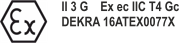
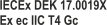
Certification | Identification | Applicable standards |
|---|---|---|
ATEX |
| EN IEC 60079-0: 2018 |
IECEx |
| IEC 60079-0: 2017 (Ed. 7.0) |
Mounting
- Never work on live equipment. Always switch off the power supply for the device before installation, troubleshooting or maintenance. Protect the device against unintentional switching on.
- Observe the relevant accident prevention regulations for your machine (e.g. the BGV A 3, electrical systems and equipment).
- Ensure standard-compliant connection and avoid risks to personnel. Ensure that data and supply cables are laid in a standard-compliant manner and ensure correct connection.
- Observe the relevant EMC guidelines for your application.
- Avoid polarity reversal of the data and supply cables, as this may cause damage to the equipment.
- The devices contain electronic components, which may be destroyed by electrostatic discharge when touched. Observe the safety precautions against electrostatic discharge according to DIN EN 61340-5-1/-3.
Working with networks
- Restrict access to all devices to an authorized circle of persons.
- Change the default passwords to reduce the risk of unauthorized access.
- Protect the devices with a firewall.
- Apply the IT security precautions according to IEC 62443, in order to limit access to and control of devices and networks.
Working with the software
- The sensitivity of a PC against malicious software increases with the number of installed and active software.
- Uninstall or disable unnecessary software.
Further information on the safe handling of networks and software can be found in the Beckhoff Information System:
http://infosys.beckhoff.com
Document name |
|---|
IPC Security Guideline |