Configuration of the CX51x0 Embedded PC
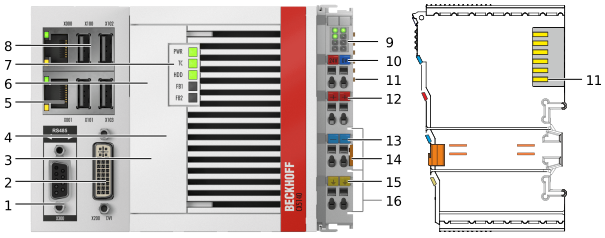 Fig.1: Example configuration of a CX5140 Embedded PC.
No. | Component | Description |
|---|---|---|
1 | Optional interface (X300). | Space for interfaces such as RS232, EtherCAT, CANopen or others. |
2 | DVI-I interface (X200). | Interface for a monitor or panel. |
3 | CFast card slot (under the front flap). | Slot for industrial CFast cards. |
4 | MicroSD card slot (under the front flap). | Slot for industrial microSD cards. |
5 | Ethernet interfaces RJ45 (X000, X001). | For connecting to local networks or the internet. |
6 | Battery compartment (under the front flap). | Power supply for the battery-backed clock for time and date. |
7 | Diagnostic LEDs. | Diagnostic LEDs for power supply, TwinCAT and the optional interface. |
8 | USB interfaces (X100, X101, X102, X103). | Interfaces for peripheral devices such as mouse, keyboard or USB memory. |
9 | Diagnosis of the power supply for the embedded PC and the terminal bus. Status of the E-bus and K-bus communication. | |
10 | Spring-loaded terminals, +24 V and 0 V | Power supply for embedded PC. |
11 | Terminal bus (K-bus or E-bus) | Interface for EtherCAT Terminals or bus terminals. Data exchange and supply. |
12 | Spring-loaded terminal, +24 V | Power supply for bus terminals via power contact. |
13 | Spring-loaded terminal, 0 V | Power supply for bus terminals via power contact. |
14 | Terminal release | Releases the power supply terminal and therefore the embedded PC from the mounting rail. |
15 | Spring-loaded terminal, ⏚ | Spring-loaded terminal for power contact ⏚. |
16 | Power contacts, +24 V, 0 V, ⏚ | Power contacts for bus terminals. |