Setting up: Real-time Ethernet (BK90xx, ADS/RAW, EAP polling)
|
Table of contents |
|---|
Notes on the device
- An EAP (poll) adapter must be created in the configuration in order to operate a CU2508 downlink port as an EAP real-time Ethernet interface for IO devices (BK90xx, EK90x).
- The EAP (EtherCAT Automation Protocol) is operated here in the so-called polling mode
- At least TwinCAT 2.11R3 is required for operation on the master side.
Setting up the real-time Ethernet device
For the setup a real-time Ethernet adapter is to be created as usual.
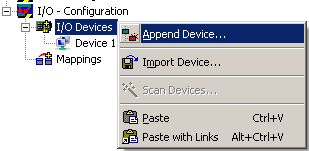 Fig.57: Creating a new device
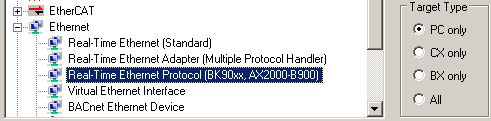 Fig.58: Selection of the device for BK90xx and others
Not an actual port of the PC, but rather a virtual adapter of the CU2508 is then merely selected as the Ethernet adapter for the CU2508.
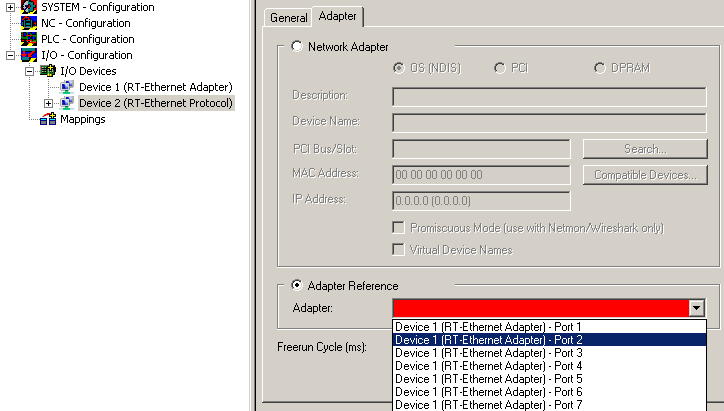 Fig.59: Selection of the CU2508 port to be used
The number of available ports (in this case 7) depends on the settings of the CU2508 device (see there).
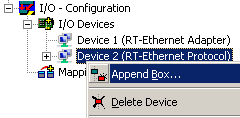 Fig.60: Adding the Ethernet devices
Subsequently the required Ethernet couplers/boxes/drives can be manually added or scanned. Before a scan TwinCAT should be restarted once in the Config/FreeRun mode.