Connecting the 24 V power supply
Notice | |
Connection of incorrect battery packs Connecting the wrong battery packs can cause damage to the device and the battery packs.
|
As an alternative to the 100-240 V AC power supply unit in the basic configuration, you can order the industrial PC with a 24 V DC power supply unit. The options C9900-P208 without integrated UPS and C9900-P209 with integrated UPS are available.
Connect power supply via 24 V DC power supply unit
Cables with a maximum cable cross-section of 1.5 mm2 can be used for connecting the power supply. For long supply lines, use 1.5 mm2 cables to achieve a low voltage drop on the supply line. There should be at least 22 V at the voltage connector of the industrial PC, so that the PC remains switched on during voltage fluctuations.
Proceed as follows to connect the 24 V DC power supply unit:
- Install the power supply cable (see the following section "Mounting the supply line").
- Plug the power supply cable into the voltage socket of the industrial PC.
- Connect the industrial PC to your external 24 V power supply.
- Switch on the 24 V power supply.
External battery pack at C9900-P209
If you ordered your device with the C9900-P209 power supply unit with an integrated UPS, then you can connect an external battery pack and install it on a DIN rail near to the PC. Use only Beckhoff battery packs for this:
- C9900-U330 (http://www.beckhoff.com/c9900-u330)
You can assign the UPS output of the PC (UPS Output). PIN 4 and 5 of the battery pack are available for looping through a 24 V power supply. Accordingly, you can connect a three-core sheathed cable with plus and minus of the supply voltage as well as protective earth to the battery pack and then connect to the PC with a five-core sheathed cable. The method of connecting different components can be taken from the following wiring diagram.
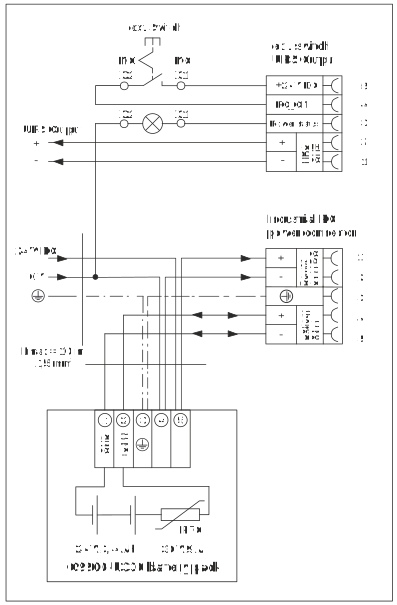 Fig.19: Wiring diagram
So that the industrial PC still has a monitor output in case of a power failure, a control panel can be connected to the UPS output (UPS OUT). Even after a power failure, 27 VDC is available there. The maximum load is 1.4 A (max. 2.5 A from year of manufacture 2016). Without the battery pack, the industrial PC and control panel switch off directly in the event of a power failure.
If the power supply unit in the industrial PC switches off, the UPS OUT output is set to 0 V. As a result, a connected control panel is also switched off. For more information on the battery pack, please refer to the corresponding manual.
Before you can connect the power supply, you must install the power supply line yourself. For this purpose, use the supplied material for connector assembly. This consists of the 5-pin connector and the strain relief housing with cable clamp and fixing screws.
Mounting the supply line
First mount the plug on the cable as follows:
- 1. Remove the insulation from the cable ends (8-9 mm).
- 2. Plug the cable ends into the connector strip by simply pressing them in. For the pin assignment of the connector, see Chapter Power supply. In the case of fine-core cables, you must use ferrules.
- You have fitted the supply line to the plug.
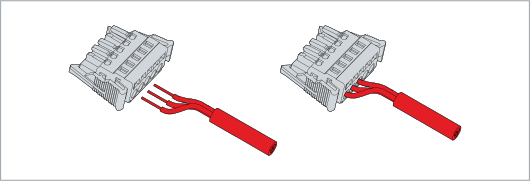 Fig.20: Mounting the supply line
Assembly of strain relief housing
Now fit the strain relief housing to the already connected plug and the supply line as shown in the following illustrations:
- 1. Press the lower part of the strain relief housing onto the connector until it engages (section A).
- 2. Fasten the supply cable to the strain relief housing using the cable clamp and fastening screws (section B).
- 3. Attach the upper part of the strain relief housing by snapping it onto the lower part (section C).
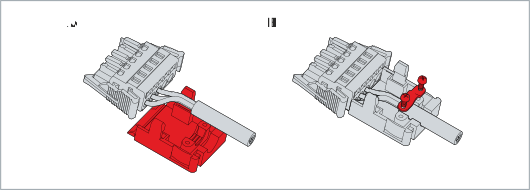 Fig.21: Assembly of strain relief housing
- You have mounted the strain relief housing (section D).
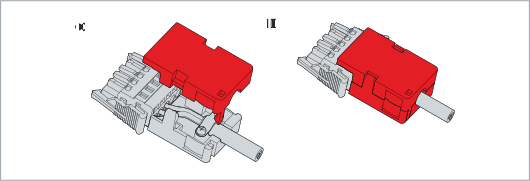 Fig.22: Mounting upper part of strain relief housing
To dismantle the strain relief housing, proceed as follows:
- 1. Use your fingers to bend the latching lugs on the lower part slightly outwards.
- 2. Lever the upper part off the lower part.
- 3. Cut the cable tie.
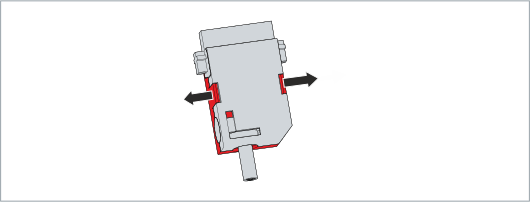 Fig.23: Disassembly of the strain relief housing
- You have dismantled the strain relief housing.