Restoring a backup
 | Use a suitable backup for the restore Avoid incompatibilities and use the right backup for your device. |
The backup of a Beckhoff RT Linux® image can in principle be restored to any storage medium. However, make sure that the backup is only used on a device of the same series, e.g. CX51x0, CX20x3, C6015 etc., as otherwise incompatibilities may occur.
Use a flash tool such as Rufus to do this. The backup is copied directly to the storage medium, in this example in VHDX format.
Prerequisites:
- Existing backup of a Beckhoff RT Linux® image (see also: Creating a backup).
Proceed as follows:
- 1. Start Rufus on a PC with Windows operating system. The storage medium (MicroSD, CFast) should already be integrated under Windows.
- 2. Click on Select and select the image you want to copy to the storage medium.
- 3. Select the microSD card as the target drive under Device.
- 4. Click on Start to start the copying process.
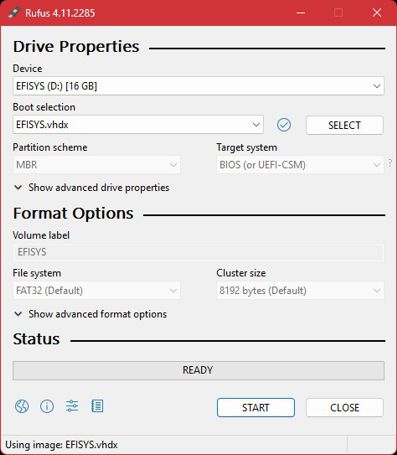
- The process may take a few minutes. Do not cancel the process until the Ready message appears. Then boot the industrial PC from the storage medium used and start Beckhoff RT Linux®.