Creating a backup
This chapter describes how you can create a backup copy of a Beckhoff RT Linux® image using the Rufus flash tool. The backup copy is created in VHDX format. It does not matter which storage medium is used for the backup. This can be either a microSD card or a CFast card.
Prerequisites:
- Memory card reader
- Download Rufus from: https://rufus.ie/
Proceed as follows:
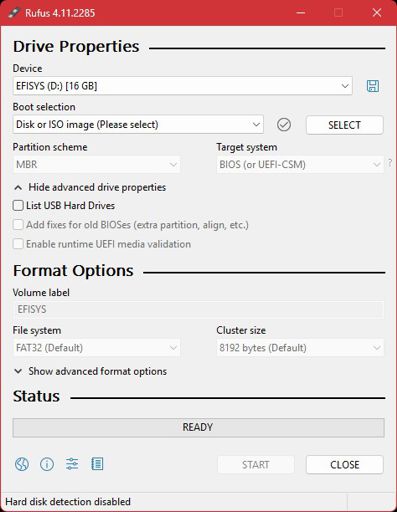
- 1. Start Rufus on a PC with Windows operating system. The storage medium (MicroSD, CFast) should already be integrated under Windows.
- 2. The storage medium from which a backup copy is to be created appears under Device.
- 3. Click on Show advanced drive properties to enable advanced settings.
- 4. Click on the floppy disk icon to open the save function.
- 5. The file type Compressed VHDX Image (*.vhdx) is already chosen. Then choose the appropriate storage location and click START to create the backup copy.
- You can then manage the backup copy created in VHDX format as you wish or restore the backup copy and thus the Beckhoff RT Linux® image (see: Restoring a backup).