Electrical installation
| |
Avoid contact with DC link DC+ and DC- Measure the voltage on the DC link test contacts DC+ and DC-. Observe the waiting times after disconnection from the supply network:
|

Notice | |
Damage due to improper grounding or faulty contacting Improper grounding or faulty contacting can lead to damage to the connected multi-axis servo system or to EMC interference emissions. The minimum cross-sections of separate protective conductors can be found in DIN EN 61439-1.
|

- ►Loosen and remove screws [1] and [2]
- ►Remove cover [3]
- ►Loosen screws [1] and [2], but do not remove them
- ►Feed a sufficiently dimensioned cable [1] through the clamping device [2] into the terminal box [3]
- ►Connect the cable [1] to the connections [2] and the grounding point [3]
- ►Ground the surface as shown in the figure with nut [1], spring washer [2], washer [3] and bolt [4]
- ►Tighten screws [1] and [2] again
- ►Connect the other end of the cable to the terminal of the power supply module:


Power supply module | Terminal |
|---|---|
AX8620 | X01 |
AX8640 | X02 |
AX85xx | X02 |
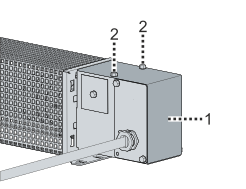
- ►Replace cover [1]
- ►Insert and tighten the fastening screws [2]
Further Information