Setting the load parameters in Drive Manager 2
In Drive Manager 2, the stepper motor drive ASI8100 can be customized more specifically to the application.
Under theBasic Settings tab, the following parameter settings are available under theLoad menu item:
- NC Feed constant
- Load inertia (reflected on motor side)
- Mechanical torque limit on motor
- Mechanical speed limit on motor
 | Transfer parameters to the NC After setting the parameters, they must still be transferred to TwinCAT NC. In this “Quick Start Guide for commissioning”, this is done in the next step,Test run, by activating the TwinCAT configuration. |
Open theLoad menu item
- ►Select “Basic Setting” as a choice
- ►SelectLoad
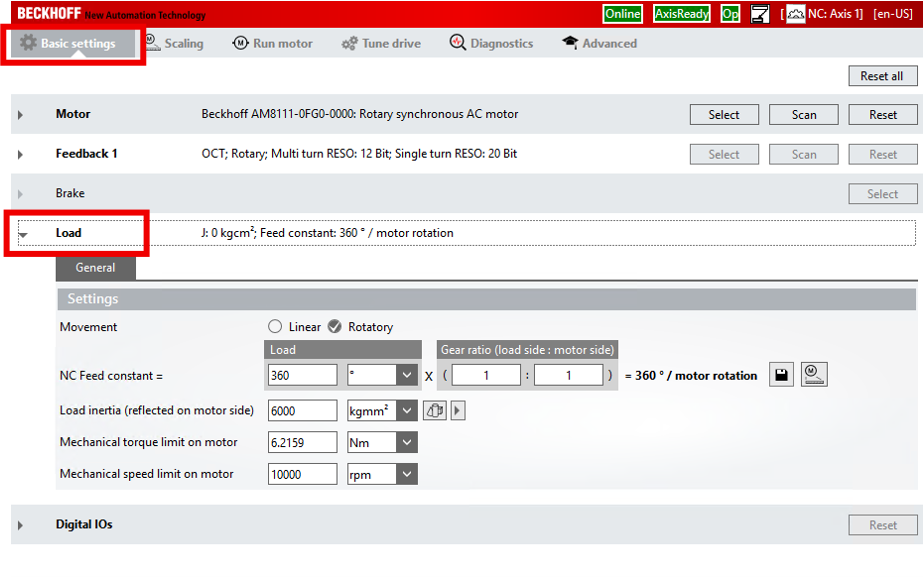
NC Feed constant
The NC Feed constant defines the traveled distance of the load per revolution of the motor shaft. With the NC Feed constant you can, for example, map the transmission ratio of a gear unit.
Example calculation for a rotary NC axis with gear unit ratio i = 10 (reduction ratio):

Load inertia (reflected on motor side)
 | Moment of inertia calculator If you are using a gear unit, use the moment of inertia calculator |
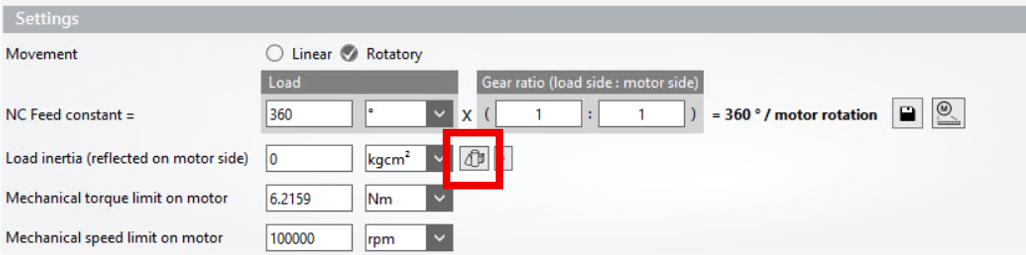
If you know the moment of inertia of the load, proceed as follows:
- ►Enter the moment of inertia.
- ►Confirm the entry with [Enter].
| → | A button appears: Recalculate VCtrl Kp and reset Tn. |
- ►Click the Recalculate VCtrl Kp and reset Tn button.
| → | The Drive Manager 2 calculates suitable controller parameters for the velocity controller. |
Mechanical torque limit on motor
This value is the upper limit for the motor shaft torque. Set the value according to the application's requirements.
| Incorrect information is possible If you use a gear unit, the torque at the gearbox output may be higher than at the motor shaft. Please keep this in mind when entering the value. |
Mechanical speed limit on motor
This value is the upper limit for the speed of the motor shaft. Set the value according to the application's requirements.
| Incorrect information is possible If you use a gear unit, the speed at the gearbox output may be higher than at the motor shaft. Please keep this in mind when entering the value. |