Integration in TwinCAT
Open the TwinCAT Solution
- ►Open an existing TwinCAT solution with an EtherCAT master and I/O configuration.
Integration into the I/O configuration
- ►Import the stepper motor drive ASI8100 either by scanning it or by adding it manually.
In the course of the integration, a dialog box appears:
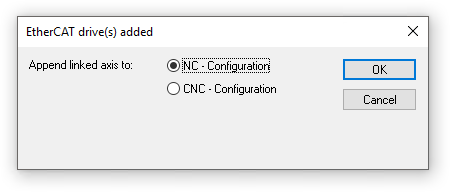
- ►SelectNC - Configuration and click on “OK”
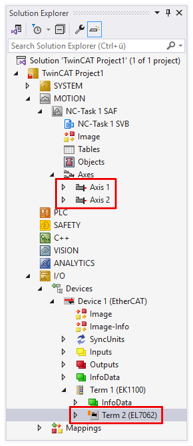
The stepper motor drive ASI8100 is integrated into the I/O configuration and the NC configuration of your TwinCAT project.
Drivemanager 2: Create a project
- ►Select the menu item File > Add > New Project in TwinCAT
| → | A dialog box opens. |
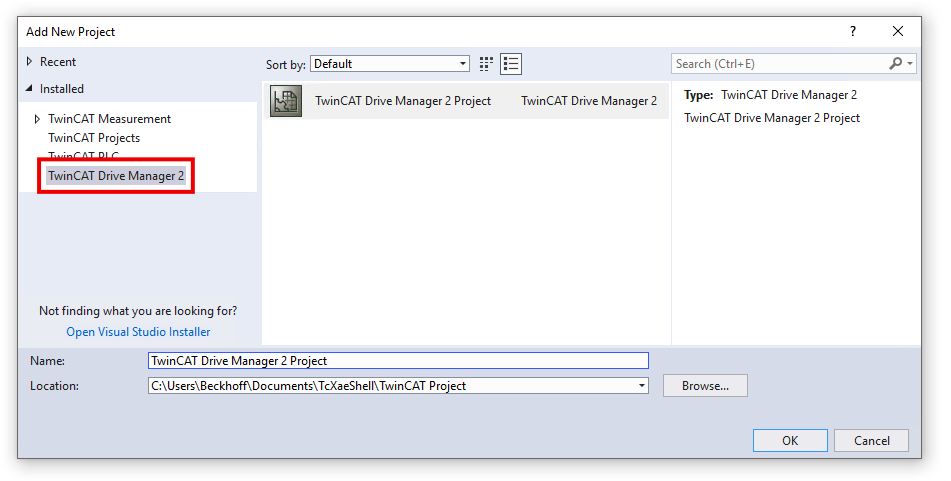
- ►SelectInstalled >TwinCAT Drive Manager 2 in the dialog box on the left-hand side and click on OK
| → | If the TwinCAT project contains multiple EtherCAT masters, the following dialog box appears: |
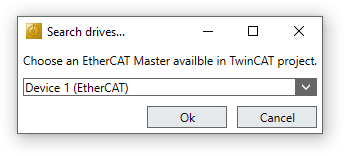
- ►Select the EtherCAT master to which the stepper motor drive ASI8100 is connected.
| → | A dialog box opens. |
- ►In the dialog box, make a choice for the motor supply voltage and click “OK.”
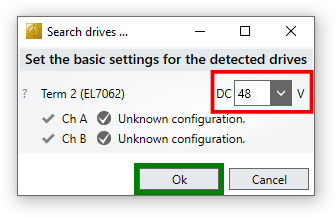
The Drive Manager 2 project was created.
The ASI8100 was integrated into the project.
Field-oriented control
Field-oriented control is enabled by default in the ASI8100. It offers users more efficient control and enables load-dependent current supply, which, among other things, also allows homing “to the limit.”