MC_CamTableSelect
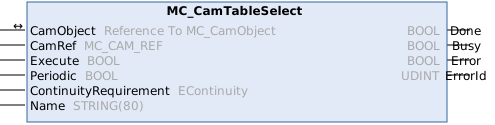
This function block selects the cam table. Internally the function block calls CamObject.Connect() if the cam object is linked to an existing cam table object, otherwise CamObject.Create(), and CamObject.Construct() are called based on CamRef data.
Syntax
Definition:
FUNCTION_BLOCK MC_CamTableSelect
VAR_IN_OUT
    CamObject             : Reference To  MC_CamObject;
END_VAR
VAR_INPUT
    CamRef                : MC_CAM_REF;
    Execute               : BOOL;
    Periodic              : BOOL;
    ContinuityRequirement : EContinuity;
    Name                  : STRING(80);
END_VAR
VAR_OUTPUT
    Done                  : BOOL;
    Busy                  : BOOL;
    Error                 : BOOL;
    ErrorId               : UDINT;
END_VAR
 Inputs
|
Name |
Type |
Default |
Description |
|---|---|---|---|
|
CamRef |
|
Data point information. | |
|
Execute |
BOOL |
|
Start cam select at rising edge. |
|
Periodic |
BOOL |
|
Set to TRUE for a periodic cam table. |
|
ContinuityRequirement |
EContinuity |
|
Minimum continuity requirement. The higher the requirement, the stricter the point validation. |
|
Name |
STRING(80) |
"" |
Only applicable if the cam object is not linked and creation of a new cam table object is required. |
 Outputs
|
Name |
Type |
Description |
|---|---|---|
|
Done |
BOOL |
Selection succeeded |
|
Busy |
BOOL |
Function block is not finished and new output values are to be expected. |
|
Error |
BOOL |
Error occurred within function block. |
|
ErrorId |
UDINT |
Error identifier |
Versionsinformation
- TwinCAT Standard >= v3.1.4026.23.1
- TF5550 MC3 Camming >= v4.0.6 (inkludiert TF5500 MC3 Base >= v4.0.6)
Required License
TC3 MC3 Camming