MC_CamRemove
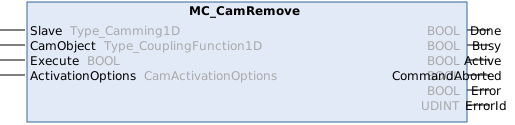
This function block removes a cam table coupling from a slave. As a cam table can only be used once in a coupled slave, the master information is not needed. However, the cam table must be in use when this function block is executed and when the activation condition is met, otherwise an error is triggered.
If there is no active coupling left and there are no pending commands to add couplings, the camming synchronization ends by itself and axis state changes to Standstill.
Syntax
Definition:
FUNCTION_BLOCK MC_CamRemove
VAR_INPUT
Slave : Type_Camming1D;
CamObject : Type_CouplingFunction1D;
Execute : BOOL;
ActivationOptions : CamActivationOptions;
END_VAR
VAR_OUTPUT
Done : BOOL;
Busy : BOOL;
Active : BOOL;
CommandAborted : BOOL;
Error : BOOL;
ErrorId : UDINT;
END_VAR Inputs
Name | Type | Description |
|---|---|---|
Slave | Type_Camming1D | Reference to the slave axis |
CamObject | Cam object to be removed (reference to the object) | |
Execute | BOOL | Start cam remove at rising edge. |
ActivationOptions | Options controlling how the cam coupling is activated (mode, position, reference object). |
 Outputs
Name | Type | Description |
|---|---|---|
Done | BOOL | Removal succeeded |
Busy | BOOL | Function block is not finished and new output values are to be expected. |
Active | BOOL | Function block has active control on the axis. |
CommandAborted | BOOL | Command is aborted by another command. |
Error | BOOL | Error occurred within function block. |
ErrorId | UDINT | Error identifier |
Versionsinformation
- TwinCAT Standard >= v3.1.4026.23.1
- TF5550 MC3 Camming >= v4.0.6 (inkludiert TF5500 MC3 Base >= v4.0.6)
Required License
TC3 MC3 Camming