MC_CamIn
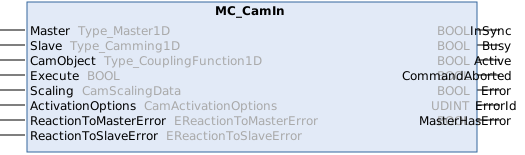
This function block initiates camming-based synchronization on a slave.
If the slave is already coupled to one or more cam table couplings,
it switches to the cam table coupling that is entered in this function block.
Note: Use MC_CamAdd to switch from single-camming to multi-camming.
Switch back and forth between single-camming and multi-camming is possible and not limited.
Syntax
Definition:
FUNCTION_BLOCK MC_CamIn
VAR_INPUT
    Master                : Type_Master1D;
    Slave                 : Type_Camming1D;
    CamObject             : Type_CouplingFunction1D;
    Execute               : BOOL;
    Scaling               : CamScalingData;
    ActivationOptions     : CamActivationOptions;
    ReactionToMasterError : EReactionToMasterError;
    ReactionToSlaveError  : EReactionToSlaveError;
END_VAR
VAR_OUTPUT
    InSync                : BOOL;
    Busy                  : BOOL;
    Active                : BOOL;
    CommandAborted        : BOOL;
    Error                 : BOOL;
    ErrorId               : UDINT;
    MasterHasError        : BOOL;
END_VAR
 Inputs
|
Name |
Type |
Default |
Description |
|---|---|---|---|
|
Master |
Type_Master1D |
|
Reference to the master axis |
|
Slave |
Type_Camming1D |
|
Reference to the slave axis |
|
CamObject |
|
Reference to the cam object | |
|
Execute |
BOOL |
|
Start cam in at rising edge. |
|
Scaling |
|
Scaling of the new coupling | |
|
ActivationOptions |
|
Options controlling how the cam coupling is activated (mode, position, reference object). | |
|
ReactionToMasterError |
EReactionToMasterError |
TriggerSlaveError |
Reaction if an error occurs in the master while this command is active. |
|
ReactionToSlaveError |
EReactionToSlaveError |
TriggerMasterError |
Reaction if an error occurs in the slave while this command is active. |
 Outputs
|
Name |
Type |
Description |
|---|---|---|
|
InSync |
BOOL |
Synchronization succeeded |
|
Busy |
BOOL |
Function block is not finished and new output values are to be expected. |
|
Active |
BOOL |
Function block has active control on the axis. |
|
CommandAborted |
BOOL |
Command is aborted by another command. |
|
Error |
BOOL |
Error occurred within function block. |
|
ErrorId |
UDINT |
Error identifier |
|
MasterHasError |
BOOL |
Master is in error state. |
Weiterführende Informationen
Für ActivationOptions.ReferenceObject gelten die folgenden Regeln:
- ReferenceObject ist nicht erforderlich, wenn die Kurvensynchronisation eingeleitet wird (zur Aktivierung wird die Master-Kurventabellenkopplung dieses Funktionsbausteins verwendet).
- Standardmäßig wird die aktive Master-Kurventabellenkopplung des Slaves verwendet, sofern nur eine vorhanden ist (ReferenceObject = 0). Bei mehreren Slaves muss ReferenceObject = CamObject gesetzt werden, um die korrekte Kopplung einzustellen.
- ReferenceObject darf nicht 0 sein, wenn mehr als eine aktive Master-Kurventabellenkopplung vorhanden ist.
Ergänzungen zu ReactionToSlaveError und ReactionToMasterError
Grundsätzlich gilt bei einem Fehler der Slave-Achse:
- Slave-Achse: Die Kopplung wird aufgelöst und die Reaktion ist abhängig vom Fehlertypen.
- Master-Achse: Die Master-Achse meldet einen Fehler und folgt einer Stopprampe der MC oder führt ihre laufende Bewegung ohne Beeinflussung fort.
Bei einem Fehler der Master-Achse gilt:
- Master-Achse: Reaktion ist abhängig vom Fehlertypen.
- Slave-Achse: Die Slave-Achse meldet einen Fehler und folgt einer Stopprampe der MC oder den Sollwerten der Master-Achse.
Ausführliche Informationen sind im Kapitel Fehlerverhalten dokumentiert.
Versionsinformation
- TwinCAT Standard >= v3.1.4026.23.1
- TF5550 MC3 Camming >= v4.0.6 (inkludiert TF5500 MC3 Base >= v4.0.6)
Required License
TC3 MC3 Camming