Configurator
By default, the Default Configuration creates a part and a track with all necessary settings. This setting is useful if you want to configure a closed XTS system with the XTS Configurator. If you work mainly with Track Management, this setting should be disabled.
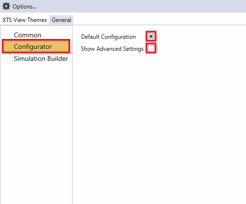
- ►Click on Configurator
- ►Activate the checkbox Default Configuration to configure a closed system
OR
- ►Deactivate the checkbox Default Configuration to configure a system with Track Management
- ►Activate the checkbox Show Advanced Settings to show advanced settings
OR
- ►Deactivate the checkbox Show Advanced Settings to hide advanced settings
Property | Explanation | Default setting |
|---|---|---|
Default Configuration | Simplifies the configuration of parts and tracks in a closed XTS system in the XTS Configurator | Enabled |
Show Advanced Settings | Display of the advanced settings | Disabled |