Starting
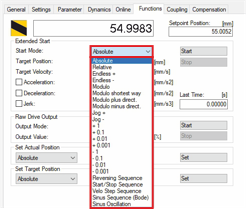
- ►Select Absolute in the drop-down menu Start Mode
- ►Enter the target positions in the input field Target Position
- ►Enter a value for the velocity in the input field Target Velocity
- ►If required, activate the checkbox Acceleration to enter a value for the acceleration in the input field
- ►If required, activate the checkbox Deceleration to enter a value for the deceleration in the input field
- ►If required, activate the checkbox Jerk to enter a value for the jerk in the input field
- ►Click on Start to start the function Absolute
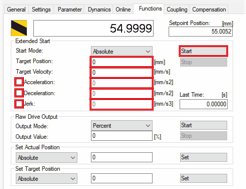
The mover moves to the target position entered.