Processing Unit
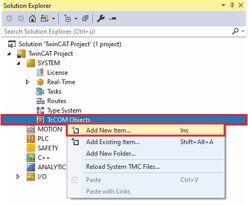
- ►Expand Solution Explorer > TwinCAT Project > SYSTEM
- ►Right-click on TcCOM Objects to open the context menu
- ►Click Add New Item... in the context menu
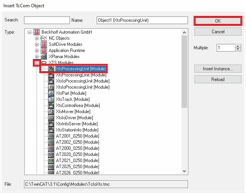
The Insert TcCOM Object dialog box opens.
- ►Expand Beckhoff Automation GmbH > XTS Modules
- ►Select XtsProcessingUnit [Module]
- ►Double click on the selection or confirm with OK
A Processing Unit is added to the TcCom objects.