Automatic
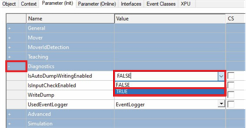
- ►Expand Diagnostics
- ►Select TRUE in the drop-down menu IsAutoDumpWritingEnabled
To apply the settings, the configuration must be reactivated and the TwinCAT system must be restarted.
- ►Restart TwinCAT
For example, the dump files are written automatically on events such as a Mover detection or a Mover ID detection and stored in C:\ on your target PC.