Station Layout
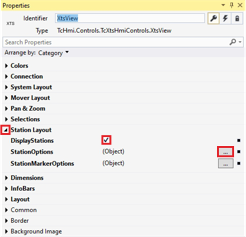
- ►Expand Properties > StationLayout
- ►Activate the checkbox DisplayStations to show the station
OR
- ►Deactivate the checkbox DisplayStations to hide the station
- ►Click ... from StationOptions
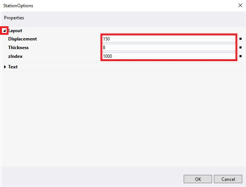
The dialog box StationOptions opens.
- ►Expand Layout
- ►Enter values in the input fields Displacement, Thickness and zIndex
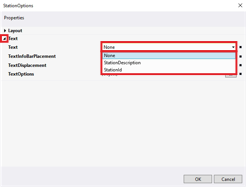
- ►Expand Text
- ►Select the text for the station in the drop-down menu Text
- ►Click on a button from TextInfoBarPlacement to select the alignment of the text
- ►Enter a value in the input field TextDisplacement
- ►Click ... from TextOptions
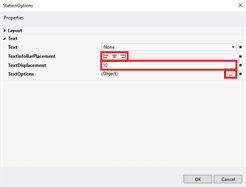
The dialog box TextOptions opens.
Further information can be found in chapter TextOptionsGeneral settings.
- ►Confirm with OK
The dialog box StationOptions closes.
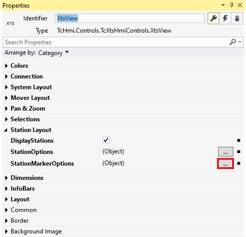
- ►Click ... from StationMarkerOptions
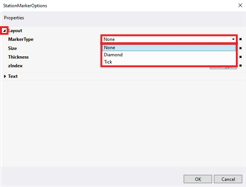
The dialog box StationMarkerOptions opens.
- ►Expand Layout
- ►Select the representation of the station endpoints in the drop-down menu MarkerType
- ►Enter values in the input fields Size, Thickness and zIndex
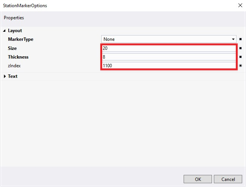
Further information can be found in chapter General settings.
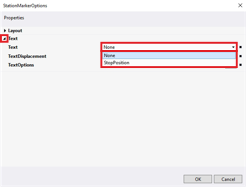
- ►Expand Text
- ►Select None in the drop-down menu Text if no text is to be displayed
OR
- ►Select StopPosition in the drop-down menu Text if the stop position is to be displayed
- ►Enter a value in the input field TextDisplacement
- ►Click ... from TextOptions
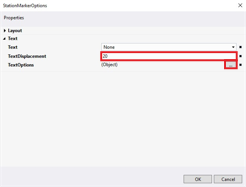
The dialog box TextOptions opens.
Further information can be found in chapter TextOptionsGeneral settings.
- ►Confirm with OK
The dialog box StationMarkerOptions closes.
The table shows the default parameter settings for the Station Layout properties:
Property | Explanation | Default setting |
|---|---|---|
DisplayStations | Display of the dimensions | True |
StationOptions |
| … |
|
|
|
| Offset between InfoBar and the center of the stator | 150 |
| InfoBar thickness | 8 |
| Z-position, position of the visual element and information about the update of the visual element | 1000 |
|
|
|
| Text for the station | None |
• None | No text | – |
• StationDescription | Description of the station | – |
• StationId | Id of the station | – |
| Alignment of the InfoBar |
|
• | Left aligned | – |
• | Centered | – |
• | Right aligned | – |
| Offset of the text | 10 |
| Properties for text design | … |
StationMarkerOptions |
| … |
|
|
|
| Display of the station endpoints | None |
• None | No endpoints | – |
• Diamond | Diamond endpoints | – |
• Tick | Tick endpoints | – |
| Size of the endpoint | 20 |
| Thickness of the endpoint | 8 |
| Z-position, position of the visual element and information about the update of the visual element | Select Type… |
|
|
|
| Text for the station | None |
• None | No text | – |
• StopPosition | Stop position | – |
| Offset of the text | 20 |
| Properties for text design | … |
 Layout
 left-justified
 centered
 right-justified