Assign isolated cores
For multi-core systems TwinCAT 3 offers the possibility to isolate single cores. This allows different TwinCAT tasks to be assigned to a core isolated for real-time use. This section shows how to set isolated cores in the TwinCAT/BSD console.
Requirements:
- A multi-core Industrial PC. One CPU core (Shared) for TwinCAT/BSD and three CPU cores (Isolated) should be available for different TwinCAT tasks.
Proceed as follows:
- 1. With the command
TcCoreConfan overview of the available cores and their definition Shared/Isolated can be displayed. - 2. Enter the command
doas TcCoreConf -s 1in the console. This sets a CPU core (Shared) for TwinCAT/BSD. The remaining three CPU cores are isolated. - 3. Restart the Industrial PC with the command
shutdown -r nowto apply the settings. - 4. Then you can use the command
sysctl hw.ncputo display the number of CPU cores (Shared).
- You have successfully configured one CPU core (Shared) and three CPU cores (Isolated). The settings can be controlled with the command
TcCoreConf. You can also read out the current settings from the Industrial PC in TwinCAT 3 (XAE). To do this, click on the button Read from Target at Real-Time.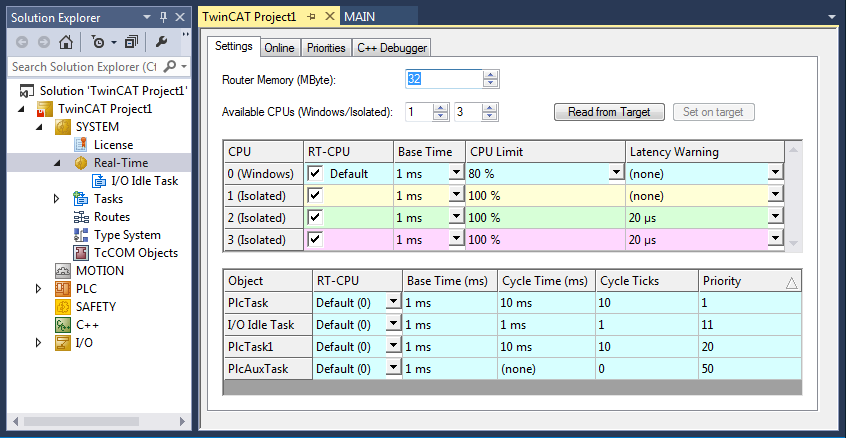
WithTcCoreConf --helpall available commands are displayed. Withdoas TcCoreConf -d, for example, all CPU cores can be reset to "Shared".
Administrator@CX-3B151A:~ % TcCoreConf -help
TcCoreConf:
   -s --set CPUs
      set number of shared cores
   -d --delete
      set all cores as shared core
   -f NAME, --file NAME
      set name of configuration file to change
   --rsdp ADDR
      set pointer for RSDP
   --show
      show active settings of shared/isolated cores
   --strip
      remove hints of unknown apic-ids
   --noflat
      don't add flat cpu topology setting