FB_MTP_ServiceControl
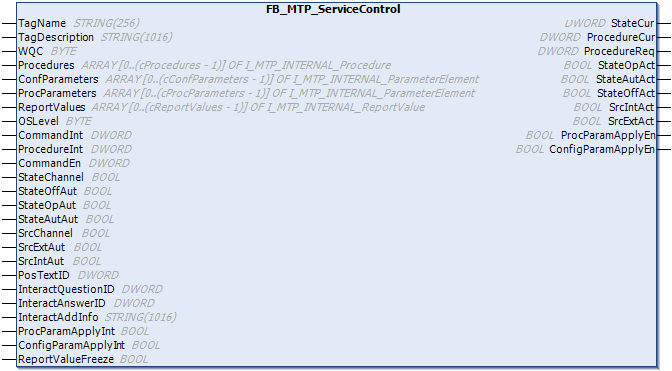
The function block FB_MTP_ServiceControl enables the execution of procedures from different sources: internal PLC logic, manual operation (e.g. via OPC UA), or control system (e.g. via OPC UA). Switching requests and value specifications are managed via Service Mode.
 | The |
| For using services, we recommend using TwinCAT 3 MTP Engineering and its built-in automatic code generation feature. |
Procedures
All procedures associated with the service are transferred as ARRAY[0..(cProcedures-1)] OF I_MTP_INTERNAL_Procedure at the input Procedures. A service requires at least one procedure.
A procedure is selected via the variables ProcedureInt, ProcedureOp, ProcedurExt depending on the state of the Service Mode of the service. The currently preselected procedure ID, which is used when the service is started, is displayed via ProcedureReq. If the procedure ID is invalid, a 0 is output here. ProcedureCur shows the procedure currently started. Only one procedure can be executed at a time.
Configuration parameters
At the input ConfParameters, all configuration parameters associated with the service are transferred as ARRAY[0..(cConfigParameters-1)] OF I_MTP_INTERNAL_ParameterElement.
The service-wide transfer of new values for the configuration parameters follows the same principle as described in the sub-chapters of ParameterElements. This is only possible for synchronized parameters Sync = TRUE. The values to be applied can be checked in advance using the variable VReq of the parameters.
The release occurs when all synchronized configuration parameters have the value ApplyEn = TRUE. At the service level, this is indicated by the variable ConfParamApplyEn = TRUE. The application can then be confirmed via variables ConfigParamApplyOp, ConfigParamApplyInt, or ConfigParamApplyExt, depending on the state of Service Mode.
Procedure parameters
At the input ProcParameter, all procedure parameters associated with the service are transferred as ARRAY[0..(cProcParameters-1)] OF I_MTP_INTERNAL_ParameterElement.
When the procedure PorcedureCur > 0 is active, new values for the procedure parameters can be applied service-wide. It applies exclusively to the procedure parameters assigned to the active procedure and follows the same principle as described in the subsections of ParameterElements. This is only possible for synchronized parameters Sync = TRUE. The values to be applied can be checked in advance using the variable VReq of the parameters.
The operation is released when all synchronized procedure parameters have the value ApplyEn = TRUE. At the service level, this is indicated by the variable ProcParamApplyEn = TRUE. The application can then be confirmed via variables ProcParamApplyOp, ProcParamApplyInt, or ProcParamApplyExt, depending on the state of Service Mode.
Report values
All report values associated with the service are applied at the input ReportValues as ARRAY[0..(cReportValues-1)] OF I_MTP_INTERNAL_ReportValue. All report values V of the service can be frozen via the input ReportValueFreeze. If the value of the input value VIn changes more than once during this time, this is displayed at the output MissedValue = TRUE of the parameter.
Architecture
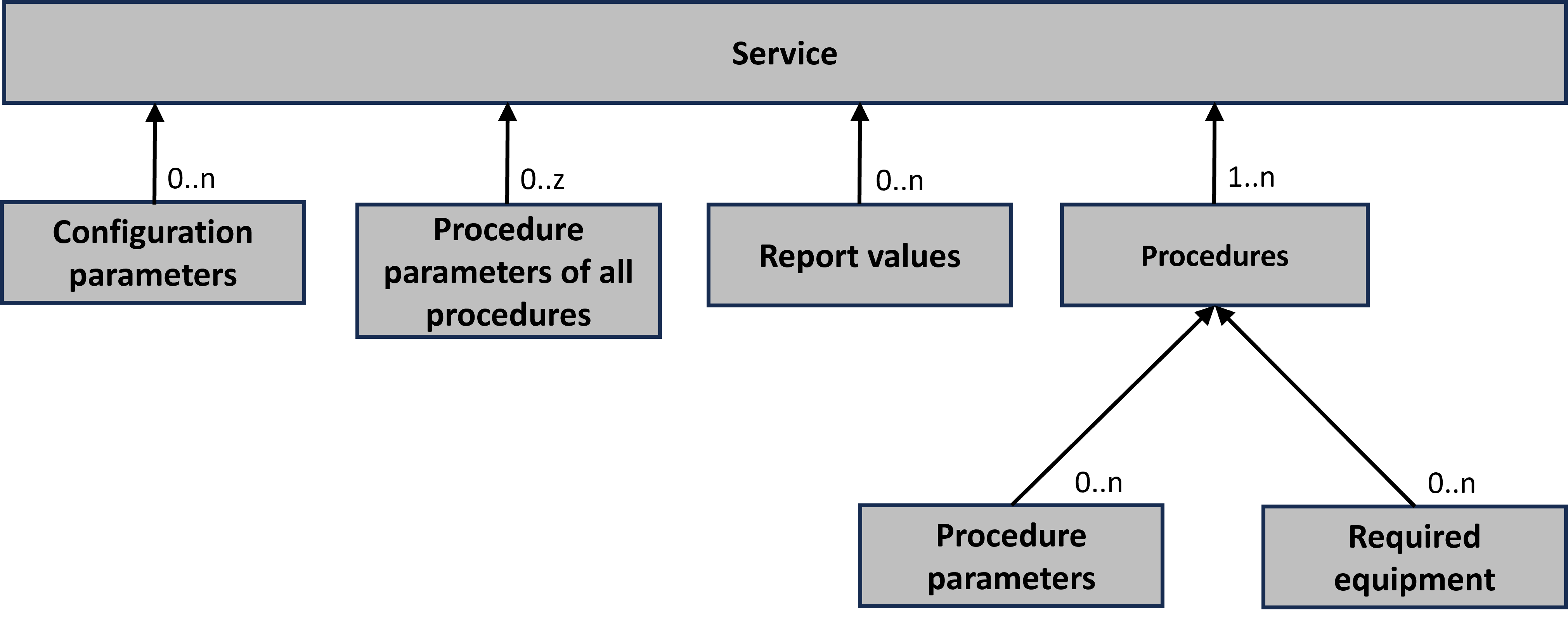
The figure below shows an overview of the arrays to be applied:
Service state machine
The service state machine has 16 states on 5 levels. The states are divided into transient and non-transient states. The transient states are reached via control commands of the control word. Non-transient states are reached after the transient states (SC) have been successfully processed. One exception is the state Execute. This can be both transient and non-transient. This is defined via the variable IsSelfCompleting in the procedure.
The service state machine is structured according to the scheme below:
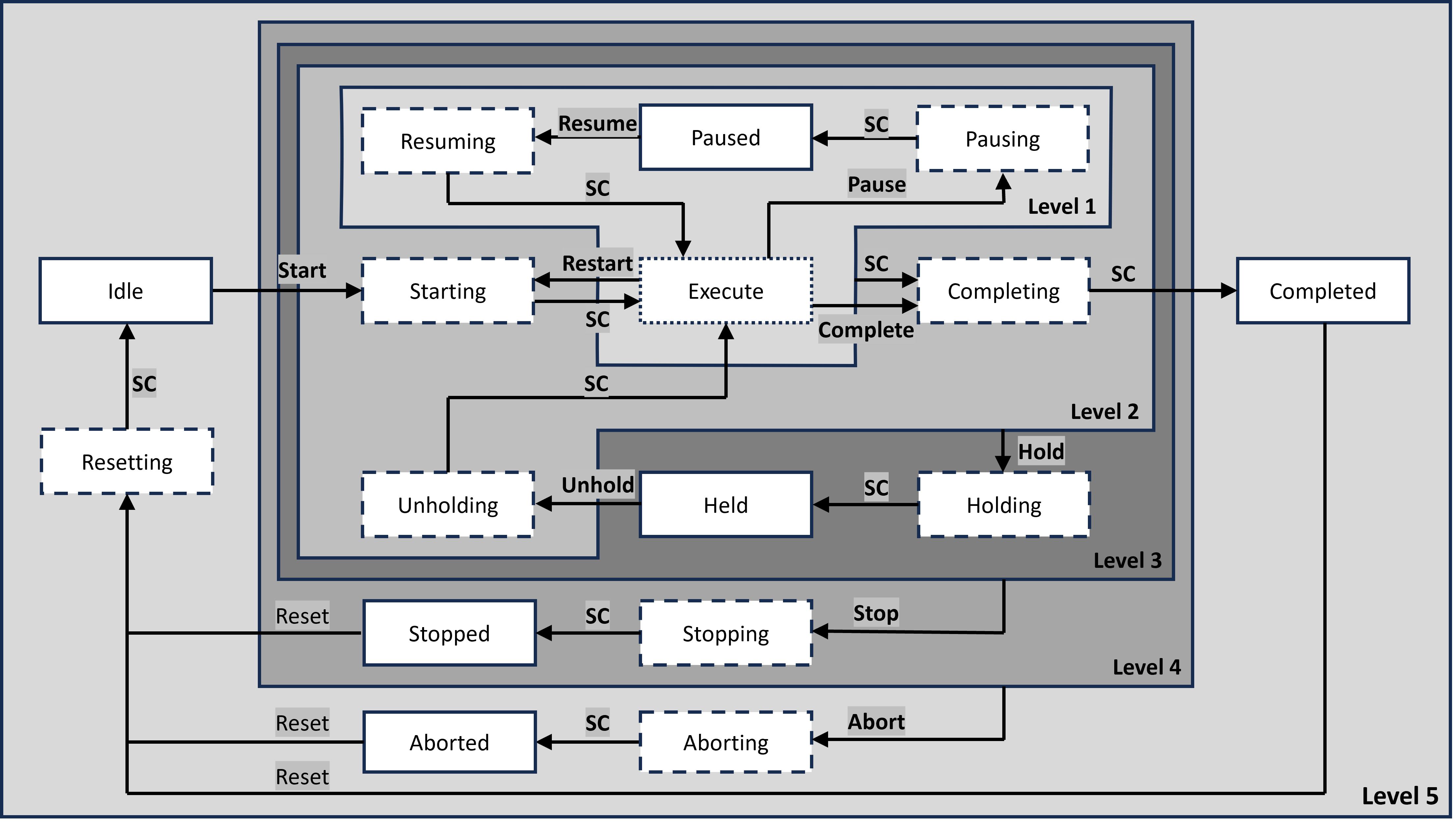
The service state machine can be viewed in different loops:
Main loop
The main loop for executing the main process technology function(s) of the machine contains the following states:
Idle→Starting→Execute→Completing→Completed→Resetting→Idle
The following loops can also be considered:
Pause loop
The pause loop can only be started from the state Execute. It is terminated by the command Resume or by a command that leads to a higher-level state.
For example:
Execute→Pausing→Paused→Resuming→Execute
Hold loop
The hold loop can be started from the states from level 2 or lower. It is terminated by the command Unhold or by a command that leads to a higher-level state.
For example:
Execute→Holding→Held→Unholding→Execute
| The hold loop can be used to enable safe intervention to prevent damage to the product. |
Stop loop
The stop loop can be started from the states from level 3 or lower. It is terminated with the command Reset or Abort.
Execute→Stopping→Stopped→Resetting→Idle
| Typically, the stop loop is used to implement the logic for stopping the service. The product may be damaged. |
Abort loop
The abort loop can be started from the states from level 4 or lower. It is terminated with the command Reset.
Execute→Aborting→Aborted→Resetting→Idle
| Typically, the abort loop is used to implement the logic for quickly stopping the service. The equipment may be damaged. |
Control of the service state machine
The variable CommandEn enables the individual control commands of the control word. The variables CommandInt, CommandOp, and CommandExt can be used to specify the control word (see ) for the service state machine depending on the state of the Service Mode.
All states can be transferred to a higher level state with a control command, provided this is enabled: e.g. all states of levels 1 and 2 can be transferred to the state Holding with the command Hold.
Execution is possible only if a valid procedure has been selected and all procedure parameters associated with the requested procedure (ProcedureReq) have ApplyEn = TRUE
Dependencies with Service Mode
If the Service Mode is transferred from the Offline state to one of the other two states Operator or Automatic*, the service state machine is always in the Idle state. It is only possible to return the Service Mode to the Offline state if the service state machine is in the basic state Idle. Switching between Operator and Automatic* is possible regardless of the state of the service state machine and does not change its current state.
Execution of procedures
Requirements for starting or restarting a procedure:
- The service state machine must be in the
Idle(Start) orExecute(Restart) state - A valid procedure must be requested:
ProcedureReq> 0. - All procedure parameters associated with the requested procedure must allow the value to be passed
ApplyEN = TRUE.
Upon startup or restart, all values of the procedure parameters associated with the requested procedure are updated, and ProcedureReq is set to 0. The service state machine is set to the Starting state.
The states, with the exception of Idle, are executed in the methods of the selected procedure with the same name. When executing transient states, the state transition (SC) occurs when the respective method returns TRUE. After successful execution, they enter their subsequent state. The current state of the service state machine is displayed via the variable StateCur (see ).
Example: The service Filling executes the procedure VolumeFilling (an instance of FB_MTP_Volume_Filling) 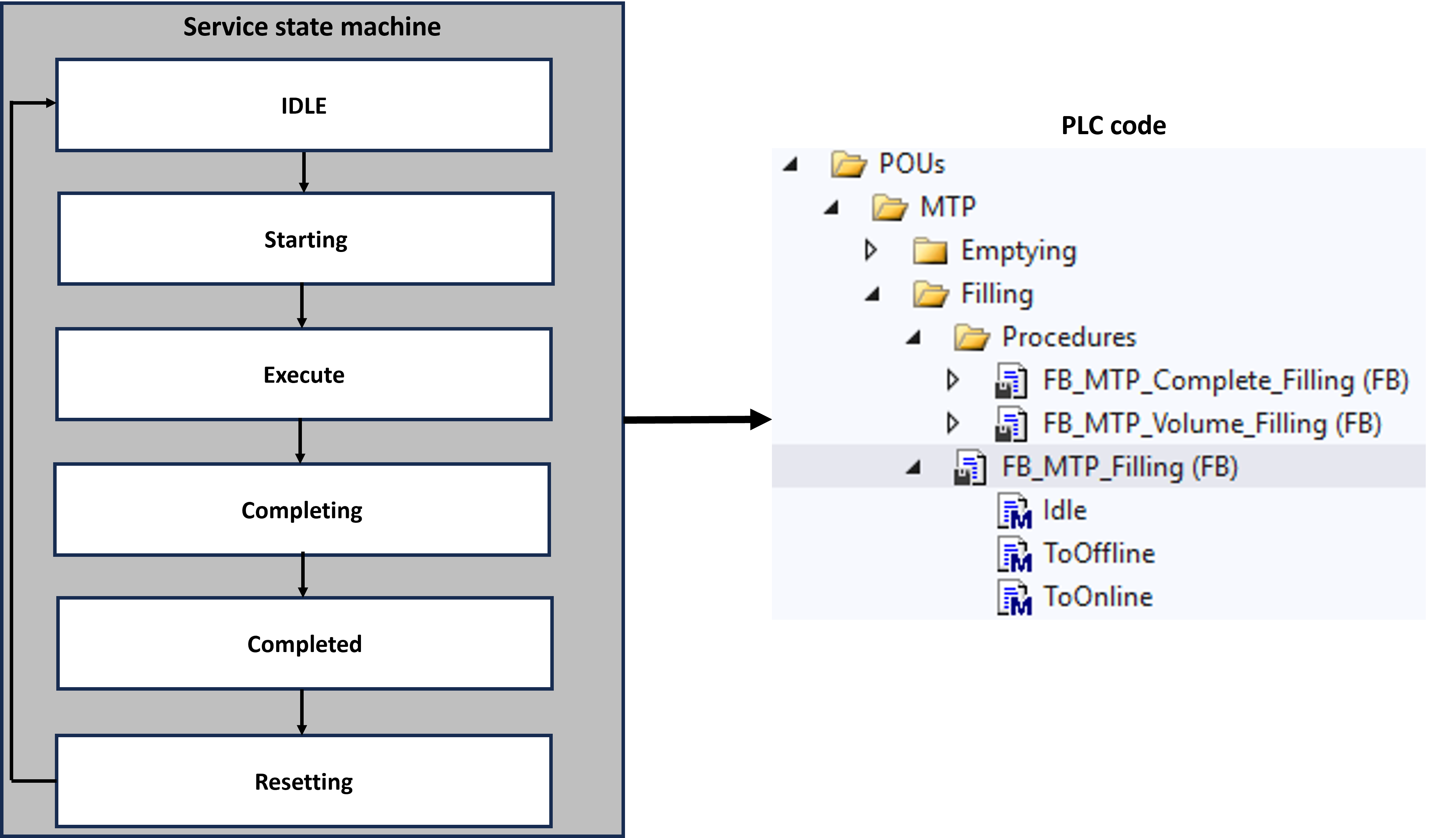
Position description
A text list can be created to describe the current state of the service in more detail. This can be used to describe the individual work steps in more detail. The variable PosTextID can be used to refer to the individual work steps in the text list.
| For the position description we recommend using the TwinCAT 3 MTP Engineering and the MTP export feature included in it, since the text list is not made available via OPC UA but is described in the MTP file. |
Service operator interaction
Interaction between the service and the operator can take place during runtime. Text lists with questions and corresponding answers are created for this purpose. The service uses the variable QuestionID to refer to a question in the text list. You will be shown possible answers to the question. When a response is selected, it is written to the service via the variable InteractQuestionID. The variable AdditionalInfo makes it possible to provide further information in text form.
| For service-operator interaction, we recommend using the TwinCAT 3 MTP Engineering and the MTP export feature included therein, since the text lists are not made available via OPC UA but are described in the MTP file. |
In the sample below, the procedures, configuration parameters, and report values are declared in the declaration part of a derivation of FB_MTP_ServiceControl and summarized in arrays. These are then called up in the body of the FB_MTP_ServiceControl. This means that all service-relevant procedures, parameters, and report values are combined in one place.
Only one procedure can be executed at a time. A procedure can only be started if the service is in the Idle state.
Syntax
// ************************************************************************
// * This file was automatically generated by TwinCAT 3 MTP Engineering.  *
// *                                                                      *
// * WARNING: Code inside regions will be overwritten by the next PLC     *
// * Generation. Code outside those regions will be preserved. You can    *
// * change the base function block or add members outside the generated  *
// * regions.                                                             *
// *                                                                      *
// * INFO: Implement service states in methods. Variables related to      *
// * this procedure should be added here. This function block can extend  *
// * existing procedure function blocks.                                  *
// ************************************************************************
FUNCTION_BLOCK FB_MTP_Filling
VAR_GENERIC CONSTANT
   cProcedures_Filling     : UINT := 1;
   cConfParameters_Filling : UINT := 1;
   cProcParameters_Filling : UINT := 1;
   cReportValues_Filling   : UINT := 1;
END_VAR
EXTENDS FB_MTP_ServiceControl<cProcedures_Filling, cConfParameters_Filling, cProcParameters_Filling, cReportValues_Filling>
VAR_INPUT
   {region 'Procedures'}
      Volume_Filling   : FB_MTP_Volume_Filling<2,4>   := (<initial values>);
      Complete_Filling : FB_MTP_Complete_Filling<1,4> := (<initial values>);
   {endregion}
   {region 'ConfigurationParameters'}
      FlowParam_Filling : FB_MTP_AnaServParam := (<initial value>);
   {endregion}
   {region 'ProcedureParameters'}
      VolumeParam_Filling : FB_MTP_AnaServParam  := (<initial values>);
      SelectParam_Filling : FB_MTP_DIntServParam := (<initial values>);
   {endregion}
   {region 'ReportValues'}
      VolumeReportValue_Filling : FB_MTP_AnaReportValue := (<initial values>);
   {endregion}
END_VAR
// Write Parameter feedbacks
FlowParam_Filling.VFbk := FlowParam_Filling.VOut;
VolumeParam_Filling.VFbk := VolumeParam_Filling.VOut;
SelectParam_Filling.VFbk := SelectParam_Filling.VOut;
// Execute base logic
SUPER^();
// Write ReportValue inputs
VolumeReportValue_Filling.Vin := VolumeReportValue_Filling.V;
Further properties
 Inputs
Name | Type | Description | OPC UA access |
|---|---|---|---|
TagName | STRING | Name of the interface | - |
TagDescription | STRING | Description of the interface | - |
WQC | BYTE | Worst Quality Code | Read |
OSLevel | BYTE | Level must be defined for system. Value 0 is reserved for local operation. | Read/write |
Procedures | ARRAY [0..(cProcedures-1)] OF I_MTP_INTERNAL_Procedure | Array with all procedures belonging to the service | - |
ConfParameters | ARRAY [0..(cConfParameters-1)] OF I_MTP_INTERNAL_ParameterElement | Array with all configuration parameters belonging to the service | - |
ProcParameters | ARRAY [0..(cProcParameters-1)] OF I_MTP_INTERNAL_ParameterElement | Array with all procedure parameters belonging to the service | - |
ReportVaIues | ARRAY [0..(cReportValues-1)] OF_I_MTP_INTERNAL_ReportValue | Array with all | - |
Commandlnt | DWORD |
| Read |
Procedurelnt | DWORD |
| Read |
CommandEn | DWORD | Enabling control commands of the control word | Read |
State* Src* |
| See Service Mode |
|
PosTextID | DWORD | ID variable for the position text | Read |
InteractQuestionID | DWORD | ID variable for the question text | Read |
InteractAnswerID | DWORD | ID variable for the answer text | Read/write |
InteractAddInfo | STRING | Additional information on the current InteractQuestionID | Read |
ProcParamAppIyInt | BOOL | Apply all | Read |
ConfigParamAppIyInt | BOOL | Apply all | Read |
ReportVaIueFreeze | BOOL | 1: Freeze all report values of the service. 0: Do not freeze the report values of the service. | Read/write |
 Outputs
Name | Type | Description | OPC UA access |
|---|---|---|---|
StateCur | DWORD | Current state of the service state machine | Read |
ProcedureCur | DWORD | Procedure currently used | Read |
ProcedureReq | DWORD | Currently preselected procedure, which is executed at start. | Read |
State* Src* |
| See Service Mode |
|
ProcParamAppIyEn | BOOL | Enable Apply procedure parameters: 1: Parameters can be applied. 0: Parameters cannot be applied. | Read |
ConfigParamAppIyEn | BOOL | Enable Apply configuration parameters: 1: Parameters can be applied. 0: Parameters cannot be applied. | Read |
External variables
Name | Type | Description | OPC UA access |
|---|---|---|---|
State* Src* | BOOL | See Service Mode |
|
CommandOp | DWORD |
| Read/write |
CommandExt | DWORD |
| Read/write |
ProcedurOp | DWORD |
| Read/write |
ProcedureExt | DWORD |
| Read/write |
ProcParamAppIyOp | BOOL | Apply all | Read/write |
ProcParamAppIyExt | BOOL | Apply all | Read/write |
ConfigParamAppIyOp | BOOL | Apply all | Read/write |
ConfigParamAppIyExt | BOOL | Apply all | Read/write |
 Methods
Name | Type | Description |
|---|---|---|
Idle |
| Non-transient initial state. No process technology function is executed. |
IsActuatorsInternal | BOOL | 1: All actuators assigned to the service are in the state |
IsActuatorsManual | BOOL | 1: All actuators assigned to the service are in the state |
IsActuatorsOffline | BOOL | 1: All actuators assigned to the service are in the state |
IsActuatorsOperator | BOOL | 1: All actuators assigned to the service are in the state |
IsActuatorsAutomatic | BOOL | 1: All actuators assigned to the service are in the state |
IsReqEqInternal | BOOL | 1: PID logic and all actuators assigned to the service are in the state |
IsReqEqManual | BOOL | 1: PID logic and all actuators assigned to the service are in the state |
IsReqEqOffline | BOOL | 1: PID logic and all actuators assigned to the service are in the state |
IsReqEqOperator | BOOL | 1: PID logic and all actuators assigned to the service are in the state |
IsReqEqAutomatic | BOOL | 1: PID logic and all actuators assigned to the service are in the state |
ParameterFeedbacks | BOOL | 1: Parameter feedback values have been written. |
ReportValueInputs | BOOL | 1: Report values have been written. |
SetActuatorsInternal | BOOL | All actuators assigned to the service are transferred to the state |
SetActuatorsManual | BOOL | All actuators assigned to the service are transferred to the state |
SetActuatorsOffline | BOOL | All actuators assigned to the service are transferred to the state |
SetActuatorsOperator | BOOL | All actuators assigned to the service are transferred to the state |
SetActuatorsAutomatic | BOOL | All actuators assigned to the service are transferred to the state |
SetReqEqInternal | BOOL | PID logic and all actuators assigned to the service are transferred to the state |
SetReqEqManual | BOOL | PID logic and all actuators assigned to the service are transferred to the state |
SetReqEqOffline | BOOL | PID logic and all actuators assigned to the service are transferred to the state |
SetReqEqOperator | BOOL | PID logic and all actuators assigned to the service are transferred to the state |
SetReqEqAutomatic | BOOL | PID logic and all actuators assigned to the service are transferred to the state |
SetOffline | BOOL | Transfer the service to the state |
SetOperator | BOOL | Transfer the service to the state |
SetAutomaticIntern | BOOL | Transfer the service to the state |
SetAutomaticExtern | BOOL | Transfer the service to the state |
SetProcParamAppIy | BOOL | Value specification (input variable of the method All service parameters assigned to the service (if All service parameters assigned to the service with input variable |
SetConfigParamAppIyEn | BOOL | Value specification (input variable method All service parameters assigned to the service (if All service parameters assigned to the service with input variable |
ToOnline | BOOL | Implementation of logic when leaving the state |
ToOffline | BOOL | Implementation of logic when entering the |