Processing at runtime
Symbol Explorer
In some projects, there are specifications for the user address key that cannot be optimally realized with the DPAD algorithm.
As an alternative to the DPAD algorithm, the name and description texts of the objects can also be edited using the BaExtension of the TwinCAT Symbol Explorer.
Persistent parameters
In existing projects, there is no access to the initial values of parameters, as these have already been overwritten with values at runtime. This is because they are persisted using the PERSISTENT keyword, the standard mechanism of TwinCAT.
For this reason, an alternative mechanism is implemented with persistent parameters to preserve access to initial values at runtime.
 | Tc3_BA2_Common version 2.2.49 or higher is required for this functionality! |
Renaming objects
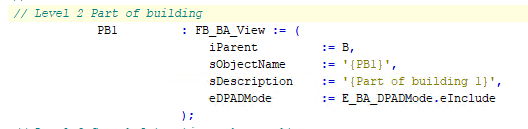
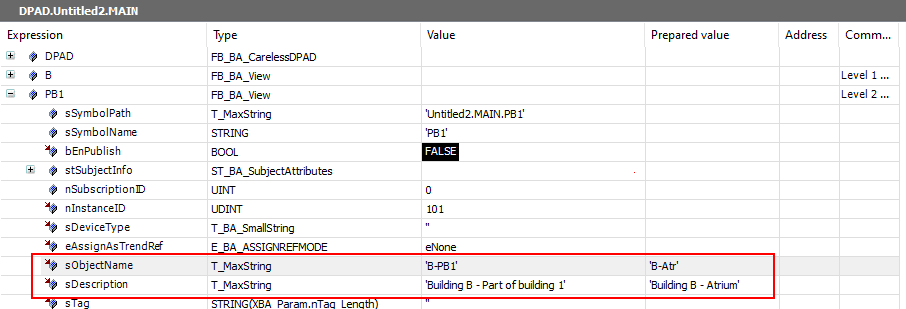
In order to generate consistent texts that also take into account possible individual extensions or restrictions and correspond to the defined DPAD, initial values are always required if parameters such as ObjectName or Description change.
The initial values are saved separately and only updated continuously in the event of changes during runtime (e.g. TcHMI, SiteExplorer or BACnet).
Application example:
- One or more objects are renamed at runtime.
- After a short delay (approx. 3 s), the initial values are persisted.
- The titles of all objects are regenerated. This ensures that child objects can take changes to parent objects into account as well.
- The newly generated titles appear in all objects.

Management of persistent parameters
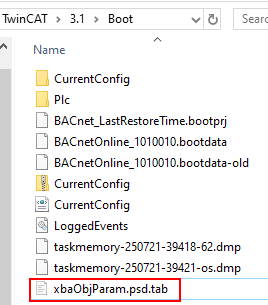
To persist the initial values, the file xbaObjParam.psd.tab.csv is stored in the boot folder.
This file contains a table of the symbol path and parameters such as ObjectName and Description. It is in CSV format so that it can be edited with a text editor.
In this context, we do not mean the well-known PERSISTENT keyword!
The term "persistent parameters" is used here to explicitly describe an alternative mechanism of persistence.
Performance
Generating texts is computationally intensive and depends heavily on the number of changes (i.e. also the objects). Cycle overruns are not uncommon during this time!
The XBA_Param.nPersistInitVal_BufferSize parameter can be used to adjust the buffer size for the number of characters per write operation. The larger the buffer, the faster the processing of all parameters.
Reading and writing is hardly computationally intensive, and with a buffer size of 4096 bytes, the process takes only a few PLC cycles. This standard setting is sufficient for most projects.
Migration
In existing projects, the creation of the file for persistent parameters must be triggered manually in order to subsequently persist the initial values.
To do this, update the Tc3_XBA library (at least version 5.6.15) and proceed according to one of the following workflows (depending on the situation):
Surrogate Migration:
- Execute project on another PLC. Persistent parameters are automatically saved in the boot folder.
- Copy file for persistent parameters to PLC.
Boot folder replacement migration
- Create a backup of the boot folder.
- Perform an overall reset and start the PLC.
Persistent parameters are automatically saved in the boot folder. - Reset PLC via cold reset.
- Replace boot folder with created backup.
Restores the previous persistent data. The file for persistent parameters remains unchanged and therefore remains in the boot folder. - Start PLC
Snapshot Migration
- Create snapshot using Symbol Explorer.
- Perform PLC overall reset.
- Update to a current Tc3_XBA library (min. version 5.6.15).
- Start PLC.
Persistent parameters are automatically saved in the boot folder. - Restore snapshot.