Installation of the TwinCAT real-time Ethernet driver
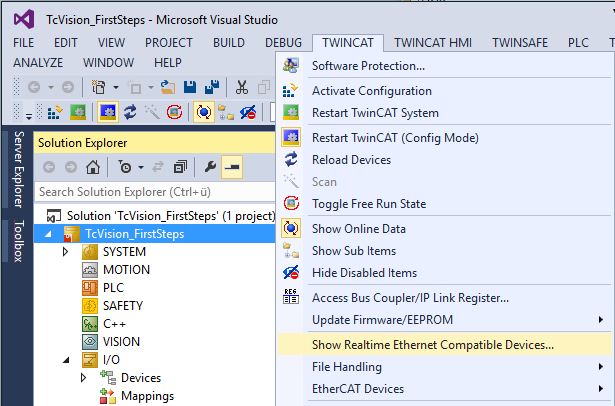
Similar to the connection of EtherCAT devices, the TwinCAT real-time Ethernet driver must be installed on the corresponding network adapter to enable connection to GigE Vision devices. To open the installation dialog, click TWINCAT > Show real-time Ethernet Compatible Devices in the Visual Studio menu.
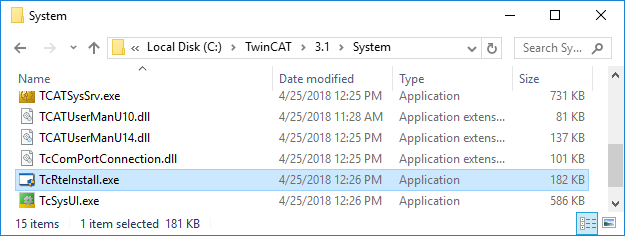
Alternatively you can call the file "C:\Program Files (x86)\Beckhoff\TwinCAT\3.1\System\TcRteInstall.exe" on the target system; this also opens the corresponding installation assistant. Under TwinCAT 3.1.4024, the file is located by default in "C:\TwinCAT\3.1\System\".
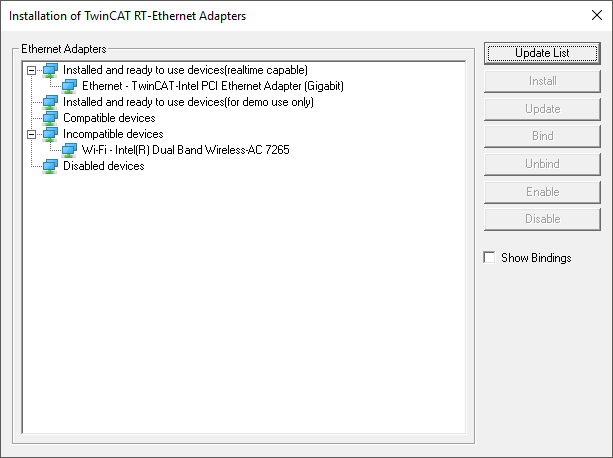
In the installation assistant, make sure that the corresponding network adapter is listed under Installed and ready to use devices (real-time capable). If this is not the case, select an appropriate adapter from the list of Compatible devices and click Install.
Notice | |
For demo use only This status is not sufficient for a stable connection and operation of GigE Vision devices. If the network adapter is only listed under this group after installation, a different adapter must be used. |