Selection
The attributes explained on this page can be found in the Selection category.
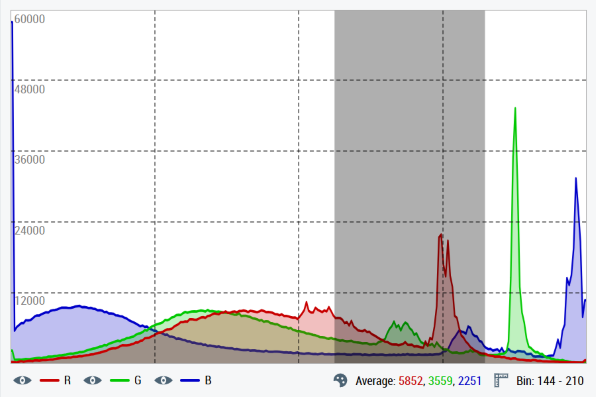
Property: SelectionMode
The SelectionMode property can be used to set whether and how color values can be selected on the histogram:
- With
Single, only a single color value can be chosen. - In
Range, several consecutive color values can be chosen by clicking, holding and dragging with the mouse. Single or Rangecombines both options.Disabledcompletely disables the selection of color values.
The selected color value (bin) and the corresponding frequency values per color channel are displayed in the info bar for a single selection. When selecting a range, the color value range and the average frequency values from this range are displayed for each color channel.
Properties: SelectionLowerBound and SelectionUpperBound
The SelectionLowerBound property contains the lowest color value (bin) of the choice for a range selection. Accordingly, the SelectionUpperBound property contains the highest color value of the choice. In the case of a single selection, both properties contain the exact same selected color value.
Property: SelectionFrequencies
The SelectionFrequencies property contains a numerical array with a length of 1-3, depending on the number of defined color channels. In the case of a single selection, it contains the frequency values of the selected color value per channel. In the case of a range selection, average values are calculated per channel.
Property: SelectionColor
The SelectionColor property is used to set the color of the selection area on the histogram. Ideally, this should be partially transparent (with an alpha value) so that the data series of the histogram below the marked area remain clearly visible.
Function: clearSelection()
Calling the clearSelection() function completely clears the current selection.
Event: onSelectionChanged
The onSelectionChanged event is triggered as soon as the choice changes (one or more color values are reselected or deselected).