Walsh template matching with rotation
In this example, template matching is performed with consideration of the rotation position in order to localize all instances of a reference image in a search image and determine their orientation.
One of the following functions is used for this purpose:
- F_VN_FindTemplateWalshExp for a search over the entire 360° range with fixed angle steps.
- F_VN_FindTemplateWalshExp_AngleRange for a targeted search limited to a defined angle range with freely adjustable angle increments.
Explanation
Walsh template matching searches for instances of a reference image in the input image on the basis of the Walsh transformation. Since just a few of these projections are usually sufficient for a reliable comparison, the method is very performant and thus also enables the search across different rotation angles in order to determine the position and orientation of rotated objects.
The sample contains three different template images for testing. The template to be used is specified via sFolderPath and sTemplateFileName. To load a new template, set bTemplateLoaded to FALSE; the image will then be reloaded automatically. The matching parameters should be checked after a template change and adjusted if necessary.
The bUseRotationSteps parameter can be used to switch between the two functions:
- If set to
TRUE,F_VN_FindTemplateWalshExpis executed. The entire rotation range (0° to 360°) is tested. The angular resolution results from the parameternRotations, whereby only the values 1, 2, 4, 8, 16 and 32 are valid. - If set to
FALSE,F_VN_FindTemplateWalshExp_AngleRangeis used. This function makes it possible to limit the search range viafStartAngleandfStopAngle(e.g. to ±90°) and to set any desired number of test steps usingnAngles.
The parameters nRotations and nAngles define the number of angular steps to be checked and thus determine the angular resolution of the search. As the algorithm interpolates between these discrete test steps, rotation values can also be determined between the explicit test angles. The selected number of test rotations has a significant influence on the total runtime of the function. To optimize performance, it is therefore advisable to limit the search range to the actual relevant angular range using F_VN_FindTemplateWalshExp_AngleRange. This allows the number of test angles to be reduced and the execution time to be minimized.
In addition, the runtime and the matching quality that can be achieved are largely determined by the interaction between nProjections and fScaleFactor. A higher number of projections allows more image information to flow into the process, which improves the reliability of the matching but increases the processing time. Similarly, a larger scaling factor (closer to 1.0) increases the accuracy with a longer processing time. As both parameters directly influence the similarity values, the threshold value fMatchThreshold must be readjusted accordingly after each parameter change.
At the end of this chapter you will find further information on parameterization and optimization of the parameters described here.
In addition, an ROI (stMatchingRoi) is set, which restricts the search area to a relevant image section. This reduces the number of pixels to be analyzed and thus shortens the processing time. However, only objects that are completely within the ROI can be found.
Execution of the template matching
First, the ROI is defined in the initial image. Depending on the bUseRotationSteps parameter, either the 360° search (F_VN_FindTemplateWalshExp) or the targeted search in a defined angle range (F_VN_FindTemplateWalshExp_AngleRange) is then carried out.
As the nRotations parameter is limited to the fixed values 1, 2, 4, 8, 16 and 32, a preceding CASE instruction ensures that the input is rounded down to the next lower valid value. Without this correction, the function would return an HRESULT 0x70B error code (INVALIDPARM).
The flags TCVN_FTWO_FUSE_MATCHES and TCVN_FTWO_ROTATED_RECTANGLE are transferred to the eOptions parameter for both search functions. The use of TCVN_FTWO_FUSE_MATCHES is always recommended, as this option combines redundant matches from slightly different rotations and positions into a single match. The TCVN_FTWO_ROTATED_RECTANGLE flag significantly simplifies the subsequent evaluation, as the results are made available directly as a structured data type TcVnRotatedRectangle.
Variables
// ROI for the template matching
stMatchingRoi       :   TcVnRectangle_UDINT := (nX := 150, nY := 150, nWidth := 740, nHeight := 650);

// Template matching parameters
bUseRotationSteps   :   BOOL := TRUE;
bShowMatchValue     :   BOOL := TRUE;
bShowRotationValue  :   BOOL := TRUE;
fMatchThreshold     :   REAL := 0.94;
nProjections        :   UDINT := 15;
nRotations          :   UDINT := 32;
fScaleFactor        :   REAL := 0.225;
eInterpolationType  :   ETcVnInterpolationType := TCVN_IT_BILINEAR;

// Template matching with angle range specific parameters.
nAngles             :   UDINT := 16;
fStartAngle         :   LREAL := -90;
fStopAngle          :   LREAL := 90;

// Template matching results
hrMatch             :   HRESULT;
ipMatches           :   ITcVnContainer;
ipMatchValues       :   ITcVnContainer;
Code
hr := F_VN_SetRoi_TcVnRectangle_UDINT(stMatchingRoi, ipImageIn, hr);

IF bUseRotationSteps THEN
    // Use when object rotation is not specified to cover up to 360° range

    // Valid values for the number of rotations: 1 (0°), 2 (0° and 180°), 4 (0°, 90°, 180°, and 270°), 8 (0°, 45°, ..., 315°), 16 (0°, 22.5°, ..., 337.5°) and 32 (0°, 11.25°, ..., 348.75°)
    // Set value to the next lower valid rotation step
    CASE nRotations OF
        0..1: nRotations := 1;
        2..3: nRotations := 2;
        4..7: nRotations := 4;
        8..15: nRotations := 8;
        16..31: nRotations := 16;
    ELSE
        nRotations := 32;
    END_CASE

    hrMatch := F_VN_FindTemplateWalshExp(
            ipSrcImage          := ipImageIn,
            ipTemplateImage     := ipImageTemplate,
            ipMatches           := ipMatches,
            fMatchThreshold     := fMatchThreshold,
            nProjections        := nProjections,
            eOptions            := TCVN_FTWO_FUSE_MATCHES OR TCVN_FTWO_ROTATED_RECTANGLE,
            nRotations          := nRotations,
            fScaleFactor        := fScaleFactor,
            eInterpolationType  := eInterpolationType,
            ipMatchValues       := ipMatchValues,
            hrPrev              := hr);
ELSE
    // Use when rotation range can be limited (e.g. ±45°)
    hrMatch := F_VN_FindTemplateWalshExp_AngleRange(
            ipSrcImage          := ipImageIn,
            ipTemplateImage     := ipImageTemplate,
            ipMatches           := ipMatches,
            fMatchThreshold     := fMatchThreshold,
            nProjections        := nProjections,
            fStartAngle         := fStartAngle,
            fStopAngle          := fStopAngle,
            nAngles             := nAngles,
            eOptions            := TCVN_FTWO_FUSE_MATCHES OR TCVN_FTWO_ROTATED_RECTANGLE,
            fScaleFactor        := fScaleFactor,
            eInterpolationType  := eInterpolationType,
            ipMatchValues       := ipMatchValues,
            hrPrev              := hr);
END_IF
Evaluation and drawing of the results
First, the system checks whether the function was executed successfully and matches were found. The matches found are iterated in order to read out the coordinates (with ROI offset) and match values and plot them in the result image. A helper function F_DrawMatchResult is provided in the project for this purpose, which draws a rotated rectangle and an arrow to represent the orientation. The match value and the detected rotation angle are also displayed. The variables bShowMatchValue and bShowRotationValue can be used to hide these texts if only the rotated rectangle is to be visualized.
Variables
stMatchRectangle    :   TcVnRotatedRectangle;
fMatchValue         :   REAL;
nNumberOfMatches    :   ULINT;
nMatchIdx           :   ULINT;

// Color and Drawing
sStatusText        :   STRING;
aColorGreen        :   TcVnVector4_LREAL := [0, 255, 0];
aColorWhite        :   TcVnVector4_LREAL := [255, 255, 255];
aColorBlack        :   TcVnVector4_LREAL := [0, 0, 0];
aColorOrange       :   TcVnVector4_LREAL := [255, 140, 0];

hr                 :   HRESULT;
Code
IF hrMatch = S_OK THEN
    hr := F_VN_GetNumberOfElements(ipMatches, nNumberOfMatches, hr);

    IF nNumberOfMatches > 0 THEN
        // Write the number of matches into result image
        sStatusText := CONCAT('Matches: ', ULINT_TO_STRING(nNumberOfMatches));

        FOR nMatchIdx := 0 TO nNumberOfMatches - 1 DO
            // Get match region
            hr := F_VN_GetAt_TcVnRotatedRectangle(ipMatches, stMatchRectangle, nMatchIdx, hr);
            // Add ROI offeset
            stMatchRectangle.aCenter[0] := stMatchRectangle.aCenter[0] + UDINT_TO_REAL(stMatchingRoi.nX);
            stMatchRectangle.aCenter[1] := stMatchRectangle.aCenter[1] + UDINT_TO_REAL(stMatchingRoi.nY);

            // Get match value
            hr := F_VN_GetAt_REAL(ipMatchValues, fMatchValue, nMatchIdx, hr);

            // Draw matches on result image
            hr := F_DrawMatchResult(stMatchRectangle, ipImageResult, bShowRotationValue, bShowMatchValue, fMatchValue, 3, 1.2, aColorGreen, aColorOrange, hr);
        END_FOR
    ELSE
        sStatusText := 'No matches';
    END_IF
ELSIF hrMatch = Tc2_System.E_HRESULTAdsErr.NOTFOUND THEN
    sStatusText := 'No matches';
ELSE
    // Last 3 hex digits of HRESULT
    sStatusText := CONCAT('HRESULT: 0x', DWORD_TO_HEXSTR((TO_DWORD(hrMatch) AND 16#FFF), 3, FALSE));
END_IF

// Draw status text
hr := F_VN_PutLabelExp(sStatusText, ipImageResult, 0, 32, 3, 3, TCVN_FT_HERSHEY_PLAIN, aColorBlack, aColorWhite, TCVN_LT_8_CONNECTED, S_OK);

hr := F_VN_ResetRoi(ipImageIn, S_OK);
Result
The results image ipImageResultDisp visualizes the matches found that were output by the functions via the ipMatches container. The ROI used is shown in blue.
The "CE" mark is searched for as a template using the default values stored in the sample code (sTemplateFileName := 'Template01.png'):
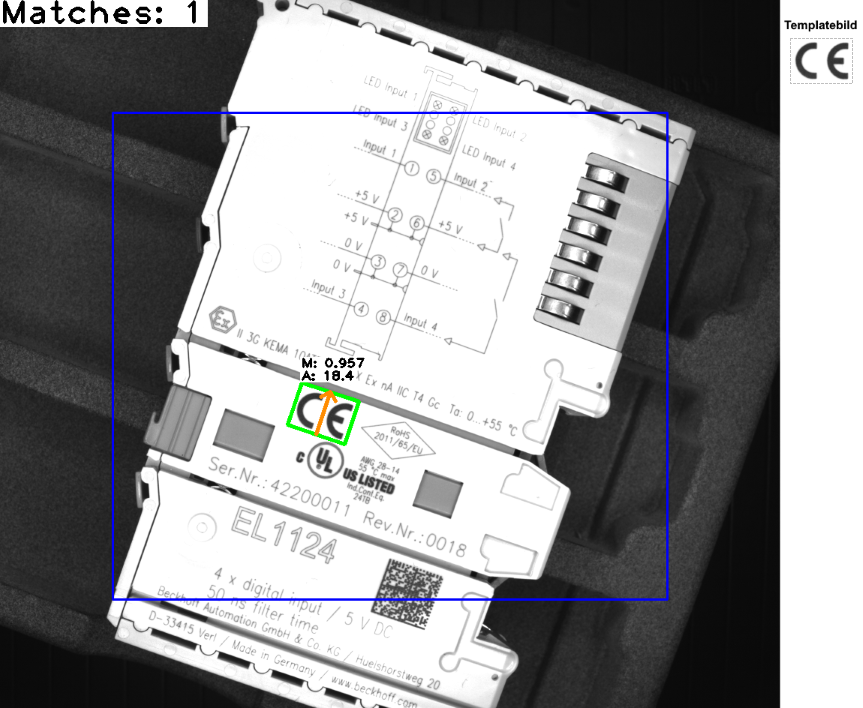
The second template (Template02.png) can be searched for with identical parameters in the image.

It is interesting to analyze the performance by evaluating the execution time after the function call via fExecutionTime_ms. As Template02.png has almost twice as large an image area overall, matching is faster in this case, although the same parameters are used.
Basically, the choice of template size and aspect ratio influence the processing time:
- Larger templates are processed faster than very small ones for algorithmic reasons.
- Square templates are preferable to rectangular formats in order to achieve the shortest execution times. However, this is only useful if the object area you are looking for can be easily isolated in a square section without too many disturbing background pixels flowing into the template.
As a second use case Template03.png can be used, for example, to check via the contacts on the terminal whether the component is present, at which position and in which orientation it is located. If, for example, only orientations of ±60° are acceptable, the F_VN_FindTemplateWalshExp_AngleRange function can be used to restrict the search range in a targeted manner:
bUseRotationSteps   := FALSE;
fStartAngle         := -60;
fStopAngle          := 60;.
The ROI must be adapted accordingly and generously dimensioned so that the contacts searched for can be reliably found for all possible rotations within the permitted ±60°. At the same time, it should be kept as small as possible so as not to extend the execution time unnecessarily. In addition, the number of test angles can be significantly reduced as the search is limited to a range of just 120°, which minimizes the processing time. The following parameters have proven effective for this scenario:
// Adjusted parameters for Template03.png
stMatchingRoi.nX        := 200;
stMatchingRoi.nY        := 10;
stMatchingRoi.nWidth    := 750;
stMatchingRoi.nHeight   := 500;

fMatchThreshold         := 0.94;
nProjections            := 18;
nAngles                  := 16;
fScaleFactor            := 0.2;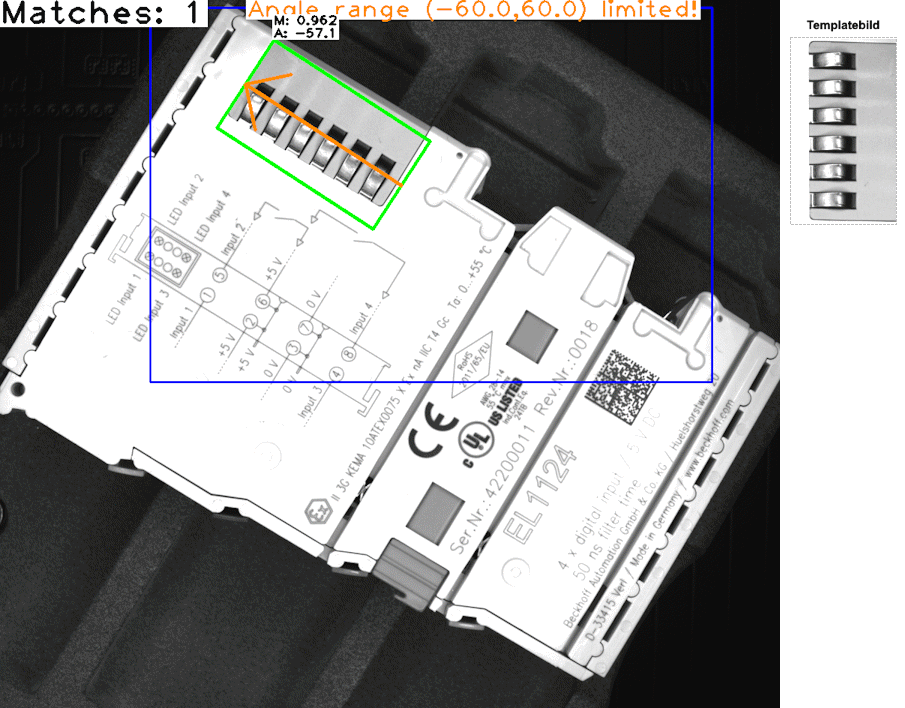
Notes on parameterization and optimization
To adapt the sample to your own applications, images or new templates, the matching parameters must be checked and adjusted if necessary. The following steps are recommended for parameterization and error analysis:
- Choice of template image: As Walsh matching is pixel-based, the suitability of the selected template image (structural quality) is decisive for the success of the recognition. The template should frame the object you are looking for with structures that are as striking, high-contrast and unique as possible (e.g. specific contours or patterns). Avoid homogeneous, featureless surfaces or highly repetitive patterns. In addition, the gray value variations of the template must match the image regions of the objects being searched for as exactly as possible. Strong deviations lead to a lower match value, which means that reliable matching may not be possible with the selected template.
- Threshold value (
fMatchThreshold):
This parameter filters the results. If the threshold value is set too high, correct matches may not be found. If it is too low, this results in many faulty matches. The match value (fMatchValue) of the objects found output by the function serves as a guide for adjusting the threshold, including a tolerance, so that valid matches are reliably separated from incorrect matches. - Stabilization of matching:
If frequent incorrect matches cannot be isolated using the threshold value alone, too little image information is often included in the matching process. A higher number of projections (nProjections) and/or a larger scaling factor (fScaleFactor) increase accuracy and reliability. As both parameters directly influence the resulting similarity values, the threshold value must be readjusted accordingly after each parameter change. - Checking the scaled input images:
The sample generates scaled debug images to check the settings. These visualize the input and template images in the exact resolution in which they are processed internally by the matching function (taking into account the parametersfScaleFactorandeInterpolationType). This visual check serves to ensure that distinctive object structures remain sufficiently visible for reliable recognition even after scaling. - Rotation angle accuracy:
If the angle determined appears imprecise, the number of angle steps to be checked (nRotationsornAngles) can be increased. However, insufficient angular accuracy may also be due to the fact that, in general, there is not enough image information fed into the matching process to reliably determine the orientation at all. - Lighting influences:
If these parameter adjustments do not lead to success, irregular lighting situations may also be the cause. By additionally passing the flagTCVN_FTWO_SKIP_DC(to theeOptionsparameter), the first Walsh projection is ignored, which means that global differences in brightness and contrast are less significant. However, this usually requires a higher number of projections. Alternatively, the real lighting situation should be improved or the non-uniformity should be rectified in advance using suitable preprocessing.