Code Quality
This sample shows how you can evaluate the quality of various 1D and 2D codes according to ISO/IEC standards. To do this:
- The functions F_VN_GradeBarcodeExp, F_VN_GradeDataMatrixCodeExp or F_VN_GradeQRCodeExp are used to evaluate one code per image.
- The execution time of the function is monitored via a watchdog.
- Various (optional) visualizations are generated for a quick or detailed analysis.
Explanation
Code grading is a process for evaluating the print quality of 1D and 2D codes in accordance with international standards. The procedure is used to ensure that codes can be reliably decoded by different readers under different conditions. The quality assessment is carried out according to specific ISO standards: for 1D barcodes according to ISO/IEC 15416:2016 and for 2D codes according to ISO/IEC 15415:2011. The assessment is carried out on a scale from 0 to 4, where 0 means very poor code quality and 4 means very good code quality.
For standard-compliant and comparable grading results, the conditions defined in the ISO standards must be met. This includes specified requirements for illumination, aperture, resolution and measuring distance. Nevertheless, the grading functions can also be used for quality checks outside the exact standard conditions. In this case, it must be ensured that the input images are sharp and evenly illuminated, that the code is centered and completely in the image and is displayed without perspective distortion if possible. Although the results are then not comparable in accordance with the standard, they still allow an assessment of the code quality, e.g. in production to check the required minimum quality.
The grading functions search for a single code within a defined image area and evaluate the quality based on the criteria defined in the corresponding standard. They also return the contour and the angle of rotation of the code found.
A 1-channel 8-bit grayscale image must be transferred to the functions. It is also necessary for the code to be in the center of the transferred image area. If the code is not in the center of the image, the position must be determined in advance using other functions and adjusted accordingly by setting a Region of interest (ROI).
For 2D code functions, the fModuleWidth parameter defines the expected minimum module width in pixels. This value should correspond as closely as possible to the actual size in the image. An absolute minimum size of 3 pixels is required. For optimum results, a range of 5 to 8 pixels is recommended. Significant deviations from the actual module width can reduce the recognition rate and significantly increase the execution time of the function.
Grading
In this sample, the code type is recognized based on the keywords found, such as "Code128", "EAN13", "DM" or "QR" in the file name. The corresponding grading function is then called up. The expert variants of the grading functions F_VN_GradeBarcodeExp, F_VN_GradeDataMatrixCodeExp and F_VN_GradeQRCodeExp are used. These provide additional detailed information and visualizations, such as scan lines, module evaluations and code contours. The parameters ipResultVisualization, ipScanLineInfo and ipMarginGrades are optional and can be set to 0, which shortens the processing time of the function. Execution of the functions is monitored by a watchdog to avoid cycle timeouts.
hrWD := F_VN_StartRelWatchdog(tStop, S_OK);
// Grade code based on code type
CASE eCodeType OF
    BARCODE:
        // Grade 1D barcode
        hrGrade := F_VN_GradeBarcodeExp(
                        ipSrcImage              :=  ipImageIn,
                        ipDecodedData           :=  ipDecodedData,
                        stCodeGrades            :=  stCodeGrades1D,
                        eBarcodeType            :=  eBarcodeType,
                        eSearchDirection        :=  eSearchDirection,
                        ipResultVisualization   :=  ipResultVisualization,
                        ipScanLineInfo          :=  ipScanLineInfo,
                        ipContour               :=  ipContour,
                        hrPrev                  :=  hr,
                        fAngleDeg               =>  fRotationAngleDeg);

        // Get overall result grade
        fGradeOverallResult := stCodeGrades1D.fOverall;

    DATAMATRIX:
        // Set module with according to image resoulution
        IF INT_TO_BOOL(Find(sFileName, '1')) OR INT_TO_BOOL(Find(sFileName, '2')) THEN
            fModuleWidth := 4;
        ELSE
            fModuleWidth := 9;
        END_IF

        // Grade 2D data matrix code
        hrGrade := F_VN_GradeDataMatrixCodeExp(
                        ipSrcImage              :=  ipImageIn,
                        ipDecodedData           :=  ipDecodedData,
                        stCodeGrades            :=  stCodeGradesDM,
                        fModuleWidth            :=  fModuleWidth,
                        ipResultVisualization   :=  ipResultVisualization,
                        ipMarginGrades          :=  ipMarginGrades,
                        ipContour               :=  ipContour,
                        hrPrev                  :=  hr,
                        fAngleDeg               =>  fRotationAngleDeg);

        // Get overall result grade
        fGradeOverallResult := USINT_TO_REAL(stCodeGradesDM.nOverall);

    QRCODE:
        // Set module with according to image resoulution
        fModuleWidth := 4;

        // Grade 2D QR code
        hrGrade := F_VN_GradeQRCodeExp(
                        ipSrcImage              :=  ipImageIn,
                        ipDecodedData           :=  ipDecodedData,
                        stCodeGrades            :=  stCodeGradesQR,
                        fModuleWidth            :=  fModuleWidth,
                        ipResultVisualization   :=  ipResultVisualization,
                        ipMarginGrades          :=  ipMarginGrades,
                        ipContour               :=  ipContour,
                        hrPrev                  :=  hr,
                        fAngleDeg               =>  fRotationAngleDeg);
        // Get overall result grade
        fGradeOverallResult := USINT_TO_REAL(stCodeGradesQR.nOverall);

    ELSE
        // Unknown code type, skip grading
        hrGrade := Tc2_System.E_HRESULTAdsErr.NOTFOUND;
END_CASE
hrWD := F_VN_StopWatchdog(hrWD, tRest => tRest);
Evaluation and visualization
After a successful function call, the result of the grading can be evaluated. Using the parameters ipDecodedData and ipContour, the codes can be read and the code contours displayed, just as for Code reading. fAngleDeg optionally specifies the rotation of the code in the image.
IF SUCCEEDED(hrGrade) THEN
    // Export decoded data to string
    hr := F_VN_ExportContainer_String(ipDecodedData, sCodeResult, 255, hr);

    // Create code result image with contour and rotation angle
    hr := F_VN_ConvertColorSpace(ipImageIn, ipImageCodeResult, TCVN_CST_GRAY_TO_RGB, hr);
    hr := F_VN_DrawContours(ipContour, 0, ipImageCodeResult, aColorGreen, 2, hr);

    sText := CONCAT('Rotation angle: ', REAL_TO_STRING(fRotationAngleDeg));
    hr := F_VN_PutTextExp(sText, ipImageCodeResult, 5, 10, TCVN_FT_HERSHEY_SIMPLEX, 0.4, aColorBlue, 1, TCVN_LT_8_CONNECTED, FALSE, hr);

    // Further processing …
END_IF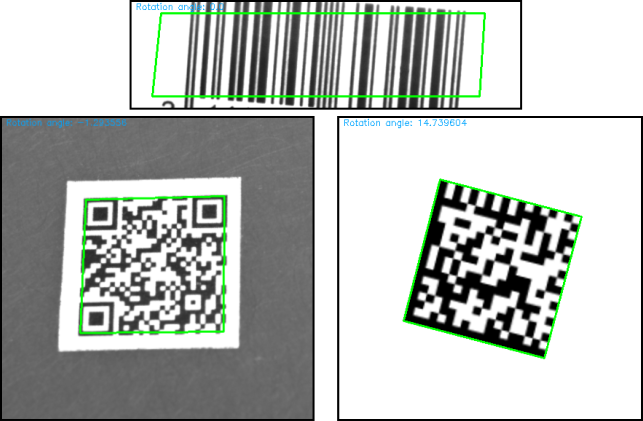
The grading results are saved in the structures stCodeGrades1D, stCodeGradesDM or stCodeGradesQR and contain the overall result and all individual grades.
The sample contains various helper functions for visualizing the results under POU/Visualization. By default, the helper function F_VisualizeGradingResult is used to generate the result image ipImageGradeResult, which displays the overall evaluation above the image ipResultVisualization generated by the grading function:
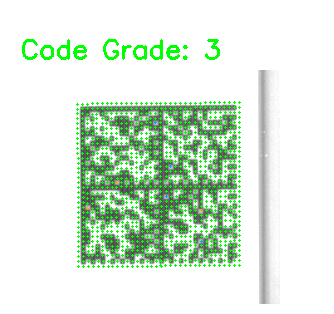
The output image ipResultVisualization of the grading functions shows the evaluation of the areas in color-coded form: Green (≥ 3.0), Blue (≥ 2.0), Orange (≥ 1.0) and Red (< 1.0). The individual scan lines are colored for 1D codes and the individual modules for 2D codes. This allows problem areas such as defects, poor modulation or insufficient contrast to be localized spatially on the code.
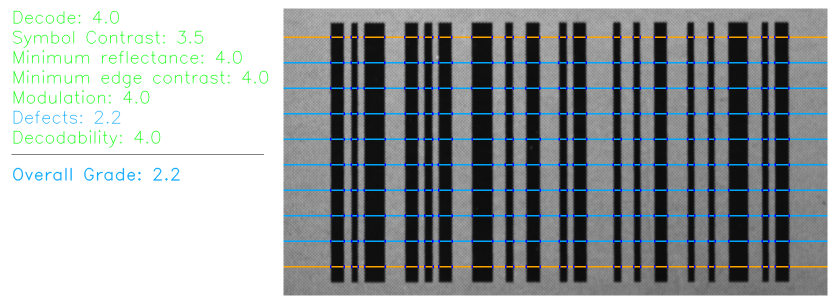
The parameter bEnableDetailedResultImage can be used to switch to a more detailed view. The helper function F_VisualizeDetailedGradingResults is used to generate an image that shows the numerical individual values of all grading parameters on the left and the image ipResultVisualization on the right:
For a more in-depth analysis, the ipScanLineInfo and ipMarginGrades containers generated by the grading function can also be evaluated.
In the example shown, for 1D codes, the F_VisualizeScanLineIntensityProfile helper function is used to generate an intensity profile of a selected search line along the scan direction and display it in ipImageCustomVisualization:
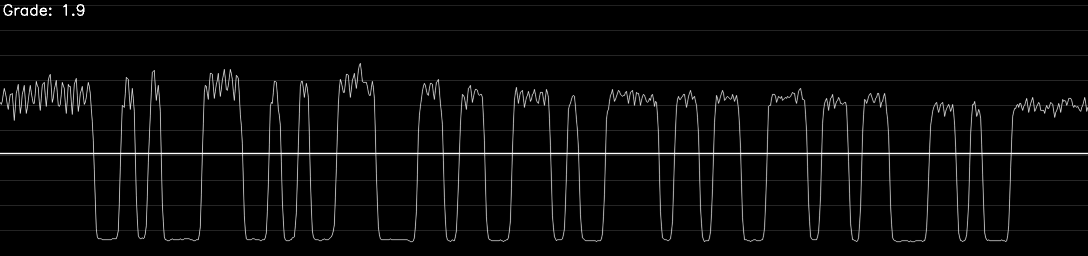
The intensity profile represents the first search line of the previously shown barcode. This explains the devaluation of the defects grade to 2.2. The intensity profile shows strong noise in the white areas due to a turbulent background. The noise intensity is so high compared to the symbol contrast that this leads to a significant devaluation in the grading and thus lowers the overall rating.
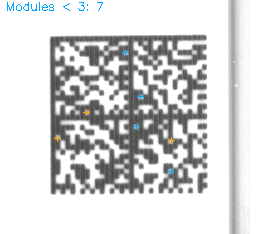
For 2D codes, the F_VisualizeMarginGrades helper function in ipImageCustomVisualization visualizes all modules of the code that have a grade less than 3: