SendSMS
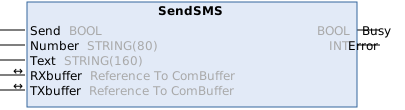
The function block SendSMS sends an SMS via a connected GSM modem. The function block is based on the 'Serial Communication' library.
Since the function block only communicates via the ComBuffer structure of the ‘Serial Communication’ library, it can be instantiated and applied to any type of serial interface.
 Inputs
VAR_INPUT
    Send   : BOOL;
    Number : String;
    Text   : String(160);
END_VAR
Name | Type | Description |
|---|---|---|
Send | BOOL | The function block is enabled by a positive edge at this input. |
Number | String | Phone number to be dialed in national format (e.g.: 0170123456) |
Text | String(160) | The SMS message to be sent |
 Inputs/outputs
VAR_IN_OUT
    RXbuffer    : ComBuffer;
    TXbuffer    : ComBuffer;
END_VAR
Name | Type | Description |
|---|---|---|
RXbuffer | ComBuffer | Structure for communication with the serial interface. An interface-specific function block in the ‘Serial Communication’ library fills this buffer with the interface data. |
TXbuffer | ComBuffer | Structure for communication with the serial interface. An interface-specific function block of the ‘Serial Communication’ library transfers the data from this buffer to the interface. |
These structures, and their usage, are described in more detail in the documentation for the ‘Serial Communication' library. The SendSMS function block is connected in the same way as a SendString or ReceiveString function block.
 Outputs
VAR_OUTPUT
    Busy   : BOOL;
    Error  : INT;
END_VAR
Name | Type | Description |
|---|---|---|
Busy | BOOL | This output is set when there is a rising edge at the Send input, and remains set until the SMS has been sent to the modem or until an error has occurred. |
Error | INT | If an error occurs during SMS transmission, the Busy output is reset and an error code is output at the Error output. |
Error code | Meaning | Cause |
|---|---|---|
0 | No error | The SMS was successfully transmitted. |
1 | No communication with the modem possible. | Is the terminal configured correctly? |
2 | Modem reports an error during configuration. | Is a compatible GSM modem connected? |
3 | Modem cannot send SMS. | Is the SIM card working properly? |
4 | Communication error. | Is the correct transmission speed set? |
Requirements
Development Environment | Target platform | PLC library to include |
|---|---|---|
TwinCAT v3.0.0 | PC or CX (x86) | Tc2_Sms |