Installation Windows CE
This part of the documentation describes how the TwinCAT 3 Function TF6350 SMS/SMTP can be installed on a Beckhoff Embedded Controller with Windows CE.
The setup process consists of the following steps:
- Downloading the setup file
- Installation on a host computer
- Transfer of the executable file to the Windows CE device
- Installing the software
- Software upgrade
Downloading the setup file
The executable file for Windows CE is part of the TF6350 SMS/SMTP setup. Therefore, you only need to obtain the corresponding setup from www.beckhoff.com, which automatically contains all versions for Windows CE (x86 and Arm®).
Installation on a host computer
After the installation, the installation folder contains three directories - one directory per hardware platform:
- CE ARM: Arm®-based embedded controllers running under Windows CE, e.g. CX8090, CX9020.
- CE-X86: X86-based embedded controllers that run under Windows CE, e.g. CX50xx. CX20x0.
- Win32: Embedded controllers running under Windows Embedded Standard, for example.
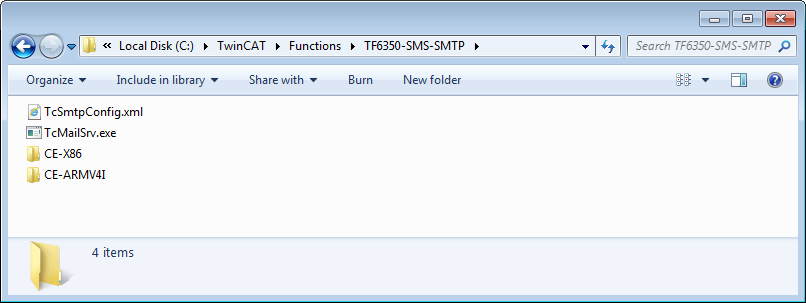
The CE ARM and CE X86 directories contain the CAB files of the TF6350 function for Windows CE in relation to the respective hardware platform of your Windows CE device. These executable files must be copied to the Windows CE device. You will find out how this works in the next chapter.
Transfer of the executable file to the Windows CE device
Transfer of the executable file to the Windows CE device.
There are several ways to transfer files, via:
- network shares
- the integrated FTP server
- ActiveSync
- CF/SD cards
For further information, please refer to the Windows CE section in the Beckhoff Information System.
Installing the software
After the file has been transferred to the Windows CE device, you must execute the file there. You can confirm the installation dialog with OK. After the installation has been completed, restart the Windows CE device.
After the device has been restarted, the executable files (client and server) are automatically loaded in the background and are now available.
The software is installed in the following directory on the CE device: \Hard Disk\TwinCAT\Functions\ TF6350-SMS-SMTP
Software upgrade
If you already have an older TF6350 SMS/SMTP version installed on your Windows CE device, you must perform the following steps on the Windows CE device to upgrade to a newer version:
- Open the CE Explorer by clicking Start > Run and entering "explorer".
- Navigate to \Hard Disk\TwinCAT\Functions\TF6350-SMS-SMTP\Server.
- Rename the file "TcMail.Srv.exe".
- Restart the Windows CE device.
- Transfer the new CAB file to the Windows CE device.
- Install the new CAB file.
- Delete the old (re-named) files.
- Restart the Windows CE device.
Once the restart has been carried out, the new version is active.
The next step after a successful installation is the licensing of the TwinCAT 3 function.