Installation Windows CE
This section describes, how you can install the TwinCAT 3 Function TF6310 TCP/IP on a Beckhoff Embedded PC Controller based on Windows CE.
The setup process consists of four steps:
- Download of the setup file
- Installation on a host computer
- Transferring the executable to the Windows CE device
- Software installation
The last paragraph of this section describes the Software upgrade.
Downloading the setup file
The CAB installation file for Windows CE is part of the TF6310 TCP/IP setup. Therefore, you only need to obtain the appropriate setup from www.beckhoff.com, which automatically includes all versions for Windows and Windows CE (x86 and Arm®).
The installation instructions for the TF6310 TCP/IP setup are included in our regular installation instructions (see Installation).
Installation on a host computer
After the installation, the installation folder contains three directories - one directory per hardware platform:
- CE-Arm®: Arm®-based embedded controllers that run on Windows CE, e.g., CX8090, CX9020
- CE-X86: X86-based embedded controllers that run on Windows CE, e.g. CX50xx. CX20x0
- Win32: Embedded controllers that run on Windows.
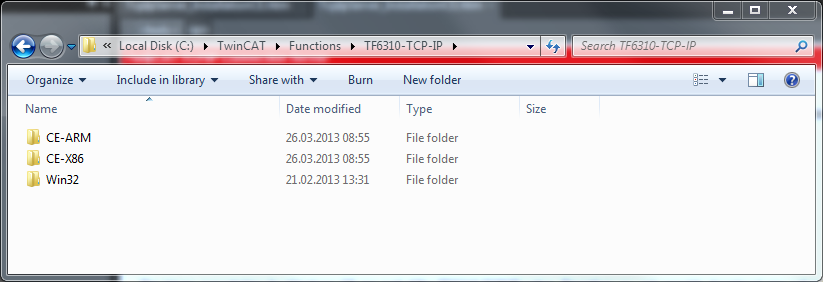
The CE-Arm® and CE-X86 directories contain the CAB files for the TF6310 function for Windows CE relating to the respective hardware platform of your Windows CE device. The file must be copied to the Windows CE device.
Transferring the executable to the Windows CE device
Transfer the corresponding executable to you Windows CE device. This can be done via one of the following ways:
- via a Shared Folder
- via the integrated FTP-Server
- via ActiveSync
- via a CF card
For more information, please consult the "Windows CE" section in the Beckhoff Information System.
Software installation
After the file has been transferred via one of the above methods, execute the file and acknowledge the following dialog with Ok. Restart your Windows CE device after the installation has finished.
After the restart has been completed, the executable files of TF6310 are started automatically in the background.
The software is installed in the following directory on the CE device:
\Hard Disk\TwinCAT\Functions\TF6310-TCP-IP
Upgrade instructions
If you have already a version of TF6310 installed on your Windows CE device, you need to perform the following things on the Windows CE device to upgrade to a newer version:
- 1. Open the CE Explorer by clicking on Start > Run and entering "explorer".
- 2. Navigate to \Hard Disk\TwinCAT\Functions\TF6310-TCP-IP\Server.
- 3. Rename TcpIpServer.exe to TcpIpServer.old.
- 4. Restart the Windows CE device.
- 5. Transfer the new CAB-File to the CE device.
- 6. Execute the CAB-File and install the new version.
- 7. Delete TcpIpServer.old.
- 8. Restart the Windows CE device.
- After the restart is complete, the new version is active.