Container
TwinCAT runtime for Linux® is a new, powerful operating system for Beckhoff controllers that combines the real-time capability of TwinCAT with the flexibility of advanced Linux® systems. One of the central innovations is the native support of container technologies such as Docker®, which enables TwinCAT functions to be installed and operated as container applications for the first time.
The use of Docker® containers opens up new possibilities for the provision, versioning and maintenance of TwinCAT functions. Functions can be encapsulated, reproducibly deployed and updated independently of the rest of the system. At the same time, users benefit from established Linux® and DevOps workflows without having to forego the deterministic real-time properties of the Beckhoff control platform.
This article describes how you can install and operate this TwinCAT function under Linux® in a Docker® container. The aim is to present the basic concepts, prerequisites and steps in an understandable way and thus create a basis for the practical use of container-based TwinCAT functions.
The following example setup shows a typical system architecture for the operation of a TwinCAT function as a Docker® container under Linux®. The TwinCAT function is executed as an independent container and integrated into the TwinCAT system via defined interfaces.
The controller is based on the TwinCAT runtime for Linux® and provides both the real-time environment for TwinCAT and the container runtime (Docker®). The TwinCAT function runs within a Docker® container and uses the resources provided by the system as well as the corresponding TwinCAT interfaces for communication with the controller and other applications. In this example, the function runs together with the TwinCAT PLC runtime in the same container, but it is also possible to separate these components.
ADS-over-MQTT can be used for TwinCAT-side communication between several containers. By using MQTT as the mediating transport layer, the individual TwinCAT components are decoupled from each other, which significantly simplifies the setup and management of ADS routes.
Instead of static, point-to-point defined ADS routes, the containers involved communicate via a shared MQTT message broker. Changes to IP addresses, container names or deployment structures therefore generally do not require any adjustments to the ADS routes, which is particularly advantageous in containerized and dynamic environments.
The message broker required for ADS-over-MQTT can also be operated as a Docker® container on the Beckhoff controller or on a separate system and thus fits seamlessly into the container-based system structure.
 | Note The following diagram provides a conceptual overview and does not represent a complete system configuration. |
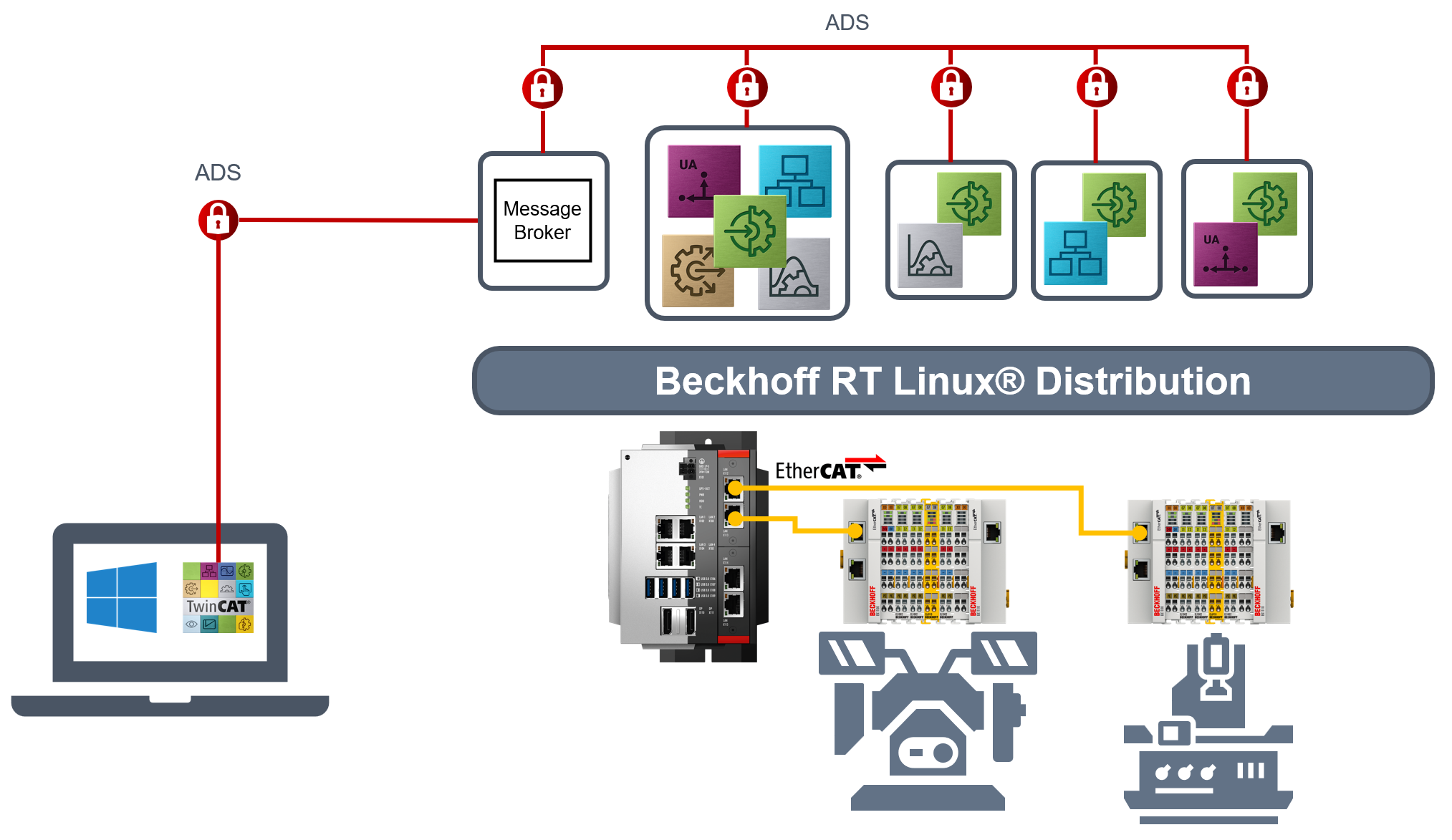
Overview of the setup
The following steps provide an overview of the basic procedure for installing and commissioning the TwinCAT function as a Docker® container. Detailed instructions and complete configuration examples can be found in the linked GitHub repository (see below).
Checking the requirements
Ensure that the controller is equipped with the TwinCAT runtime for Linux® and that Docker® is installed and activated as a container runtime.
Creating the container image
A new container image is created via a Docker® file, which contains this TwinCAT function and any dependent components.
Configuring the container
A Docker® Compose File is used to configure the parameters required to operate the container. Such parameters can be as follows, for example:
- Settings for network and communication interfaces
- Access rights and resources
- TwinCAT-specific settings (e.g. ADS routes)
- Volume mappings for storing user-specific configuration files
Starting the container
Start the Docker® container on the Beckhoff controller and check the proper start-up of the TwinCAT function.
Integrating into the TwinCAT system
Integration of the TwinCAT function into the existing TwinCAT project and testing of communication and functionality.
Monitoring and maintenance
Monitoring of the container status, evaluation of logs and execution of updates or restarts if required.
A complete, executable example with detailed documentation, configuration files and source code is available in the following GitHub repository: