APM4xxx‑0000
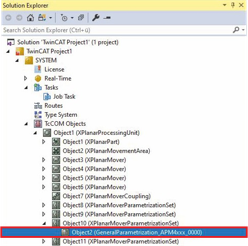
- ►Expand Solution Explorer > TcCOM Objects > Object (XPlanarProcessingUnit) > Object (XPlanarMoverParametrizationSet)
- ►Double-click on Object (GeneralParametrization)
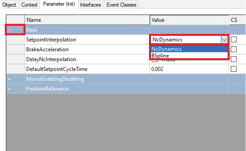
- ►Click the Parameter (Init) tab in the project window
- ►Expand Base
- ►Select the type of setpoint interpolation in the SetpointInterpolation drop-down menu
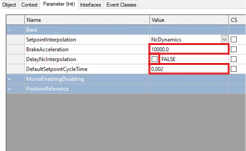
- ►Change values for BrakeAcceleration and DefaultSetpointCycleTime if required
- ►Select the DelayNcInterpolation checkbox to choose FALSE if the NC interpolation is to be delayed by one NC cycle
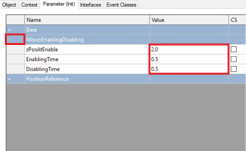
- ►Change values for zPosAtEnable, EnablingTime and DisablingTime if required
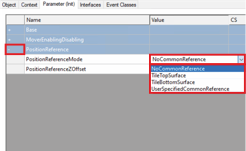
- ►Select the Z reference position in the PositionReferenceMode drop-down menu
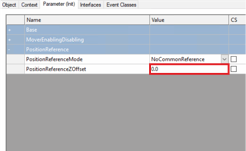
- ►Enter value for PositionReferenceZOffset

- ►Activate the Show Hidden Parameter checkbox to display the Hidden Parameters
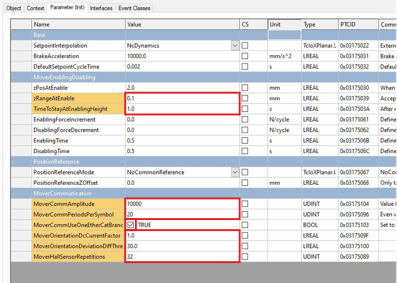
- ►Change value for zRangeAtenable and TimeToStayAtEnablingHeight if required
- ►Change value for MoverCommAmplitude and MoverCommPeriodsPerSymbol if required
- ►Select the MoverCommUseOneEtherCatBranch checkbox to choose TRUE if no synchronized EtherCAT ports are available
OR
- ►Select the MoverCommUseOneEtherCatBranch checkbox to choose FALSE if synchronized EtherCAT ports are available
- ►Change value for MoverOrientationDcCurrentFactor, MoverOrientationDeviationDiffThreshold and MoverHallSensorRepetition if required