Defining parameters
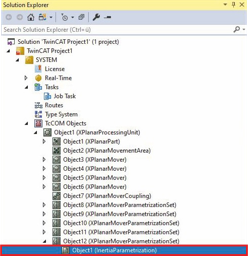
- ►Expand Solution Explorer > TcCOM Objects > Object (XPlanarProcessingUnit) > Object (XPlanarMoverParametrizationSet)
- ►Double-click on Object (InertiaParametrization)
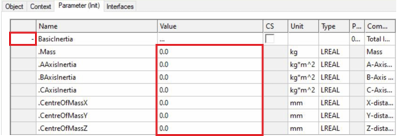
- ►Click the Parameter (Init) tab in the project window
- ►Click on + of BasicInertia to call up the input fields for the payload parameters
- ►Enter the weight of the payload in the Dimensions field
- ►Enter the inertia parameters of the payload via the AAxisInertia, BAxisInertia and CAxisInertia fields
- ►Enter the position of the payload's center of mass using the CentreOfMassX, CentreOfMassY and CentreOfMassZ fields