Defining parameters
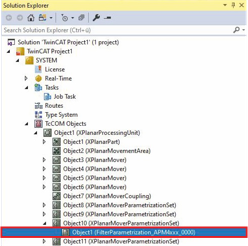
- ►Expand Solution Explorer > TcCOM Objects > Object (XPlanarProcessingUnit) > Object (XPlanarMoverParametrizationSet)
- ►Double-click on Object (FilterParametrization_APM4xxx_0000)
- ►Click the Parameter (Init) tab in the project window
- ►Select the number of Array Elements for the axes in the drop-down menu
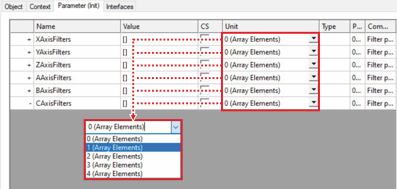
For each array element, four input fields and three drop-down menus are added to an axis.
 | At least one array element required At least one array element must have been selected from the axis drop-down menu before values can be entered into an input field or the filter type selected from the drop-down menu. Without an array element, no input fields and drop-down menus are available for input. |
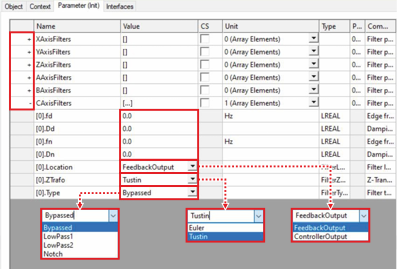
- ►Click on + of an AxisFilter to call up the input fields for the filter
- ►Select Location, ZTrafo and Type from the drop-down menus
- ►Enter the required values for fd, Dd, fn and Dn, depending on the selected filter type