HW To NC3
The actual values for the position and dynamics of the mover are provided for the application.
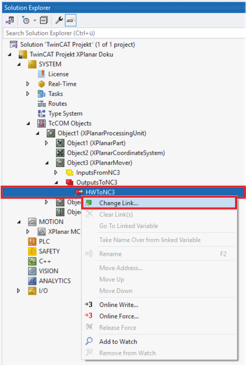
- ►Expand Solution-Explorer > System > TcCOM Objects > Object (XPlanarProcessingUnit) > Object (XPlanarMover) > OutputsFromNC3
- ►Right-click on HWToNC3 to open the context menu
- ►Click on Change Link … in the context menu
Notice | |
For HWToNC3 linking, make sure that you select the same mover that you used for NC3ToHW linking. |
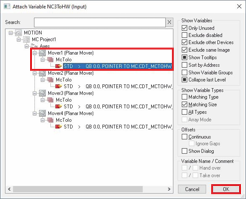
The Attach Variable HWToNC3 (Output) dialog box opens.
- ►Select the corresponding STD variable of a mover
- ►Confirm with OK
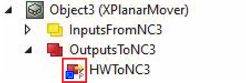
A blue arrow on the variable indicates successful linking.
- ►Create HWToNC3 links for all movers in the same way
Further Information