Tile
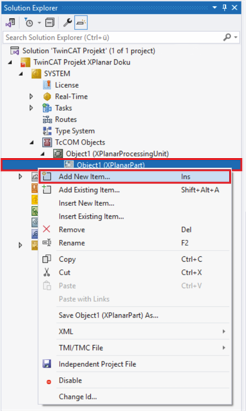
- ►Expand Solution Explorer > System > TcCOM Objects > Object (XPlanarProcessingUnit)
- ►Right-click on Object (XPlanarPart) to open the context menu
- ►Click Add New Item in the context menu
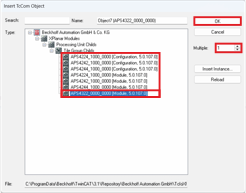
The Insert TcCOM Object dialog box opens.
- ►Click on the + button of the XPlanar Modules
- ►Click on the + button of the Processing Unit Childs to see the available TcCOM objects
- ►Select APS4xxx-x000-0000
- ►Enter the number of tiles required
- ►Double-click on the selection or confirm with OK
One or more tiles are added to the XPlanar Part.